

Building a modern PC on AMD’s AM5 platform requires balancing long-term future-proofing with realistic budget limits. While top-tier X670E and X870E boards offer extreme expansion, most gamers want a high-performance board without paying a flagship tax. This rog strix b650e-f gaming wifi review evaluates one of the most popular mid-range motherboards on the market to see if it truly deserves its reputation as the sweet-spot choice for Ryzen 7000 and 9000 processors.
Featuring full PCIe 5.0 support for both graphics cards and NVMe storage, robust power delivery, and integrated high-speed networking, the rog strix b650e-f gaming wifi aims to deliver premium ROG features at a accessible price point. In this review, we analyze its thermal performance, BIOS ease-of-use, and wireless capabilities. To see how this board ranks against competing options, check out our master guide on the Best Gaming Motherboard.
Table of Contents
1. Key Specifications: What the ROG Strix B650E-F Gaming WiFi Offers
At a technical level, the “E” in B650E stands for Extreme, signifying that key PCIe lanes are upgraded to the generation 5.0 standard.
Core Hardware Specs
- Socket: AMD AM5 (Supports Ryzen 7000, 8000, and 9000 series CPUs).
- Power Delivery: 12+2+1 power stages rated for 80A.
- Memory Support: 4x DDR5 DIMM slots (Supports 6400MHz+ via EXPO profiles).
- Expansion Slots: 1x PCIe 5.0 x16 slot (reinforced for heavy GPUs).
- Storage: 1x PCIe 5.0 M.2 slot, 2x PCIe 4.0 M.2 slots.
- Networking: Intel 2.5Gb Ethernet and integrated Wi-Fi 6E.
The inclusion of a PCIe 5.0 x16 slot ensures that when next-generation GPUs arrive, the rog strix b650e-f gaming wifi will not bottleneck graphics bandwidth.
2. Power Delivery and Thermal Performance
A motherboard’s primary job is delivering clean, stable voltage to the CPU. During our stress testing of the rog strix b650e-f gaming wifi, power delivery proved to be a major strength.
VRM Cooling under Heavy Load
Equipped with 80-amp power stages and thick aluminum heatsinks connected by a heatpipe, the board handled an unlocked Ryzen 9 7900X with ease. Under sustained stress tests, VRM temperatures remained well under 65°C, ensuring zero thermal throttling during extended gaming sessions.
For gamers planning to run high-draw processors, having reliable power stages is critical for maintaining high 1% low frame rates in heavy titles.
3. B650 vs B650E Value Analysis
Why choose this board over a cheaper, non-E B650 model? The rog strix b650e-f gaming wifi commands a $30 to $50 premium over standard B650 options.
Understanding power delivery is essential for system stability. Learn more in our technical guide: Motherboard VRMs Explained: The Secret to Overclocking Stability
The PCIe 5.0 Advantage
Standard B650 boards only offer PCIe 4.0 for the main GPU slot. While PCIe 4.0 is more than enough for current GPUs like the RTX 4070 or RX 7800 XT, PCIe 5.0 doubles available bandwidth. Choosing the rog strix b650e-f gaming wifi guarantees that your motherboard won’t need to be replaced when you upgrade your graphics card two or three years down the line.
If you are debating between these two chipset tiers, read our detailed comparison: AMD B650 vs B650E: Which Motherboard Chipset is Best for Gaming?
4. Built-in Wireless and Rear Connectivity
As the name implies, the rog strix b650e-f gaming wifi comes equipped with built-in wireless networking, eliminating the need for an add-in PCIe card.
Wi-Fi 6E Performance
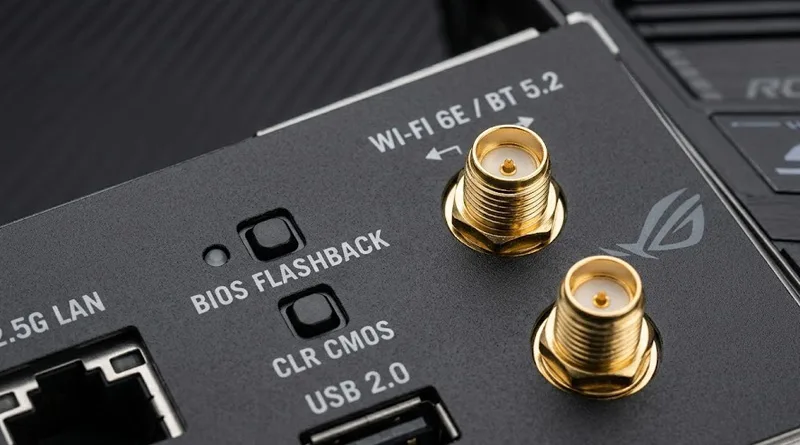
The included external Wi-Fi 6E antenna connects via gold-plated jacks on the rear panel. Operating on the clean 6GHz band, latency tests showed stable ping times that approached wired performance when placed near a compatible router.
However, for competitive esports titles, connecting directly via the onboard Intel 2.5Gb Ethernet port remains the recommended setup for absolute minimal jitter.
To get the most out of this board’s wireless capabilities, ensure your network is configured correctly. See our guide: The Best Gaming Router of 2026.
Rear I/O Features
The pre-mounted I/O shield includes:
- 12 total USB ports (including USB 3.2 Gen 2×2 Type-C).
- BIOS FlashBack button (allows updating the BIOS without a CPU installed).
- Clear CMOS button for easy recovery from aggressive memory overclocks.
- Audio jacks powered by the SupremeFX ALC4080 codec.
5. Storage and Memory Considerations
Installing components on the rog strix b650e-f gaming wifi is streamlined thanks to ASUS’s Q-Design features.
Q-Latch and Q-Release
The main PCIe 5.0 slot features the PCIe Slot Q-Release button, which allows you to unlock heavy graphics cards with a simple press rather than fumbling with a tiny plastic latch underneath a large cooler. Similarly, the M.2 slots use plastic Q-Latches instead of tiny, easily lost screws.
DDR5 Memory Stability
Using AMD EXPO profiles, the board easily brought a 32GB kit of DDR5-6000 CL30 memory to its rated speed with a single click in the BIOS.
Memory speed directly impacts frame times. Read our breakdown: Does RAM Speed and CAS Latency Really Matter for Gaming?
Conclusion: Final Verdict on the ROG Strix B650E-F Gaming WiFi
Our review of the rog strix b650e-f gaming wifi confirms why this board is a staple recommendation in the PC building community. It bridges the gap between affordable mid-range options and overpriced flagship boards.
With its excellent VRM cooling, future-proof PCIe 5.0 support, robust rear connectivity, and user-friendly Q-Design features, it provides a rock-solid foundation for any mid-to-high-end AM5 gaming build. If you have the budget for a mid-range AMD build, this board offers outstanding overall value.
Check official CPU compatibility lists on ASUS’s Support Page