

In 2026, the overall best ergonomic mouse for relieving wrist pain and preventing Carpal Tunnel Syndrome is the Logitech Lift Vertical Ergonomic Mouse because its 57-degree vertical handshake angle places the forearm in a completely neutral posture without twisting the bones, while fitting small-to-medium hands comfortably for under $70. For users with larger hands who prioritize spreadsheet and productivity workflows, the Logitech MX Master 3S remains the gold standard of contoured palm comfort, while the Razer Basilisk V3 is the premier hybrid choice for users who want ergonomic support during fast-paced PC gaming.
The traditional computer mouse was designed in the 1960s with zero regard for human anatomy. Forcing your palm to lay completely flat on a desk for eight hours a day pinches the median nerve and strains forearm tendons, leading to chronic wrist stiffness, numbness, and repetitive strain injury (RSI). Finding the best ergonomic mouse is about choosing a shape that conforms to your hand’s natural resting posture rather than forcing your muscles to adapt to a flat piece of plastic. This comprehensive guide reviews the top five ergonomic designs on the market, breaks down the medical difference between vertical and contoured shapes, and explains how to choose the right model for your hand size. To ensure your seating posture matches your desk setup, explore our master guide on Weight Gaming: The Ultimate Ergonomics Guide.
Table of Contents
1. Top 5 Best Ergonomic Mouse Rankings for 2026
We have evaluated these mice based on anatomical grip angles, sensor tracking stability, button customizability, and real-world value on Amazon.
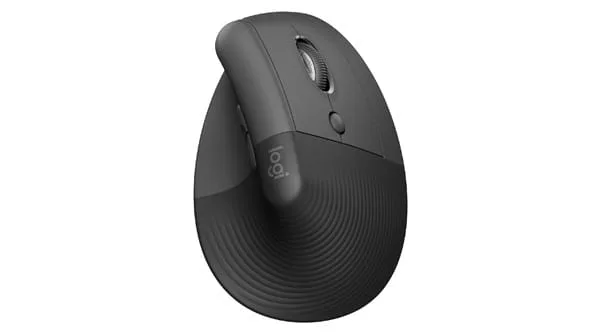
1. The Overall Best for Wrist Pain: Logitech Lift Vertical Ergonomic Mouse
This is widely recognized as the best ergonomic mouse on Amazon for users experiencing daily wrist or forearm ache. Engineered at a precise 57-degree vertical angle, it lifts your wrist off the desk and places your arm in a natural “handshake” position.
- Action Feature: Specifically sculpted for small-to-medium hand sizes, featuring near-silent clicks and a smooth SmartWheel for adaptive scrolling.
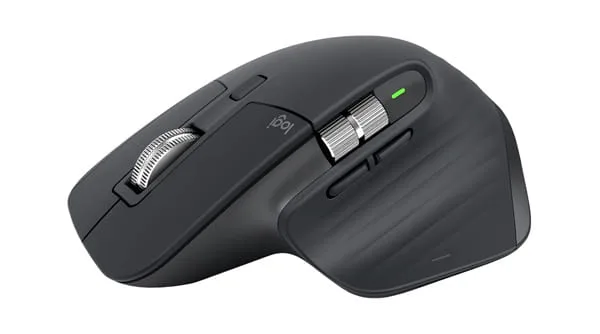
2. The Productivity King: Logitech MX Master 3S (Contoured Ergonomic)
If you don’t want a full vertical design but need unmatched palm support and workflow speed, this is the premier ergonomic mouse. It features an extended thumb rest with an integrated gesture button and a machined steel electromagnetic MagSpeed scroll wheel.
- To see why professionals and creators swear by this mouse, read our detailed review: Logitech MX Master Series 2026: Ultimate Productivity Guide.
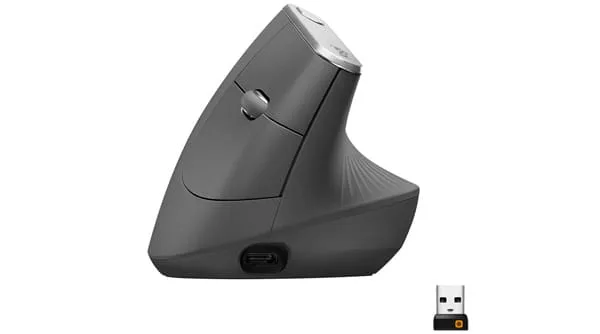
3. The Large-Hand Vertical Standard: Logitech MX Vertical
For users with medium-to-large hands who want a true vertical design, the MX Vertical is an outstanding ergonomic mouse. It uses the same medical-grade 57-degree angle as the Lift, but features a larger, taller shell that fully supports long fingers without dragging your pinky on the desk mat.
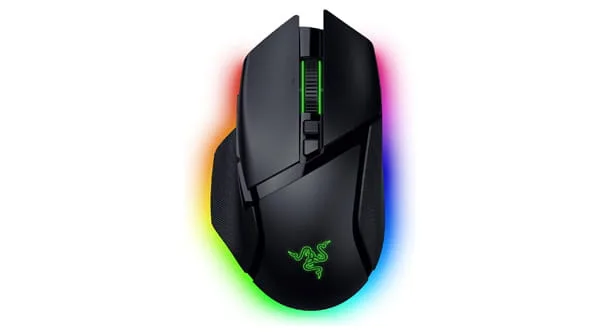
4. The Best Hybrid for Work and Gaming: Razer Basilisk V3 (or Logitech G502 X)
Full vertical mice are too clumsy for fast-paced competitive gaming. If you need a mouse that protects your wrist during the day but still flicks for headshots at night, this is the best ergonomic mouse hybrid.
- Why It Wins: Features an ergonomic right-handed flare, a dedicated thumb rest, an optical sensor with 1,000Hz+ polling, and ultra-low click latency.
- Internal Link: Compare this against its legendary rival in our breakdown: G502 Hero vs G502 X: Which Mouse Wins?
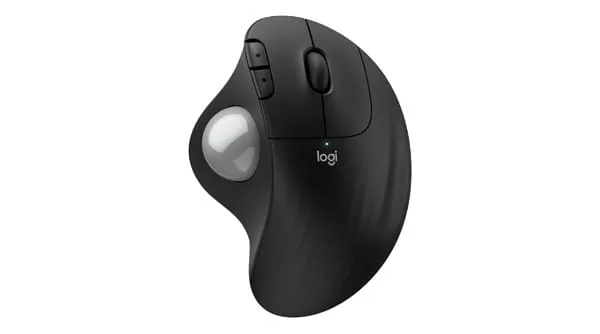
5. The Best Stationary Pick: Logitech ERGO M575 Wireless Trackball
If moving your mouse across the desk causes shoulder or elbow pain, a trackball ergonomic mouse is the ultimate solution. Your hand remains completely stationary while your thumb guides a smooth trackball to move the cursor.
- Action Feature: Requires zero desk space, making it ideal for cramped workstations or mobile lap setups.
2. Pronation vs. The Handshake Angle: The Science of Ergonomic Mouse Design
Why does a traditional flat mouse cause pain, while an ergonomic mouse provides immediate relief? It comes down to skeletal mechanics.
The Forearm Pronation Problem
When you place your palm flat against a desk to hold a standard mouse, your forearm undergoes a movement called pronation.
- The Anatomy: To get your palm flat, the radius bone in your arm physically crosses over the ulna bone. This twists the surrounding muscles, compresses the carpal tunnel canal in your wrist, and places continuous pressure on the median nerve.
The 57-Degree Neutral Handshake Position
If you let your arm hang loosely by your side, your palm does not face backward; it faces inward toward your hip.
- The Ergonomic Fix: A vertical ergonomic mouse tilts your hand at roughly a 57-degree angle, mirroring that natural resting posture. The radius and ulna bones remain parallel, blood circulation flows freely to your fingertips, and resting pressure transfers away from the delicate underside of your wrist to the durable outer edge of your hand.
3. The 4 Ergonomic Mouse Styles: Which Shape Fits Your Pain?
Not every ergonomic mouse serves the same physical purpose. You must match the shape to where you feel discomfort.
1. Vertical Mice (Best for Wrist and Forearm Pain)
- Best For: Tendonitis, Carpal Tunnel Syndrome, and tightness in the top of the forearm.
- Examples: Logitech Lift, MX Vertical, Anker Vertical Mouse.
2. Contoured Ergonomic Mice (Best for Palm and Thumb Support)
- Best For: Hand cramping and fatigue from clawing small office mice.
- Examples: Logitech MX Master 3S.
3. Trackball Mice (Best for Shoulder and Elbow Pain)
- Best For: Tennis elbow, rotator cuff stiffness, or users who cannot sweep their arm across a desk.
- Examples: Logitech ERGO M575, Kensington Expert Mouse.
4. Ergonomic Gaming Hybrids (Best for Gamers)
- Best For: PC players who want thumb-shelf support and an angled grip without sacrificing 1,000Hz competitive gaming speed.
- Examples: Razer Basilisk V3, Logitech G502 X.
4. Can You Game on an Ergonomic Mouse? (The Latency Reality)
One of the most common questions is whether an office ergonomic mouse can be used for PC gaming.
- For Casual & Strategy Games (Yes): If you play Civilization, Baldur’s Gate 3, The Sims, or Diablo, a vertical mouse works wonderfully and keeps your hand relaxed for hours.
- For Fast-Paced FPS Shooters (No): In competitive titles like Valorant or Apex Legends, vertical mice are too heavy (120g+) and their side-grip angle makes rapid horizontal wrist flicks difficult to control. Furthermore, their 125Hz office polling rates add minor input lag. Competitive players should choose an ergonomic gaming hybrid like the Razer Basilisk or G502 X instead.
5. Summary Decision Matrix: Settle Your Ergonomic Mouse Choice
Use this simple checklist to choose your ideal peripheral:
Buy the Logitech Lift if:
- You have small to medium-sized hands.
- You are experiencing wrist pain or tingling in your fingers.
- You want a quiet, wireless mouse for under $70.
Buy the Logitech MX Master 3S if:
- You have medium to large hands.
- You work in spreadsheets, coding, or video editing and need the ultra-fast MagSpeed scroll wheel.
- You want premium palm support without a steep vertical angle.
Buy the Razer Basilisk V3 or G502 X if:
- You want ergonomic thumb support during the day and high-speed competitive gaming at night.
Conclusion: Stop Working in Pain
Investing in the best ergonomic mouse in 2026 is not an optional luxury; it is basic preventative maintenance for your hands, wrists, and nervous system.
For less than the cost of a single doctor’s visit, switching to a vertical mouse like the Logitech Lift or a contoured powerhouse like the MX Master 3S relieves tendon pressure, opens up blood circulation, and lets you work and play without fatigue. Upgrade your grip today and protect your hands for a lifetime of comfortable computing.
Read the Occupational Safety and Health Administration (OSHA) Computer Workstation Mouse Guidelines]