

In the world of PC hardware, the middle ground is a battlefield. For most builders, the most difficult decision isn’t the GPU or the RAM; it’s the choice between the mid-range workhorse and the high-end enthusiast chip. The intel i5 vs i7 for gaming debate has changed significantly in 2026. With Intel’s hybrid architecture becoming more refined, the gap between these two tiers is no longer just about “more cores”—it’s about how those cores handle the chaos of modern, unoptimized games.
If you read our recent guide on Is Intel Core i5 Good for Gaming?, you know that the i5 is the value king. But does the i7 offer enough of a “safety net” for streamers and competitive players to justify a $100 price jump? This guide provides an actionable breakdown of the intel i5 vs i7 for gaming choice, focusing on frame consistency, multitasking overhead, and long-term future-proofing.
1. Core Counts and Architecture in Intel i5 vs i7 for Gaming
To understand the intel i5 vs i7 for gaming difference, you have to look at how Intel builds its “Performance” (P) and “Efficiency” (E) cores.
The i5-14600K Standard
A modern i5 typically features 6 Performance cores and 8 Efficiency cores. This is plenty for almost any game today. However, the P-cores do the heavy lifting in gaming.
The i7-14700K Advantage
The i7 usually bumps this up to 8 Performance cores and 12 Efficiency cores. In the intel i5 vs i7 for gaming comparison, those two extra P-cores are the secret weapon. Games like Cyberpunk 2077 and Warzone are now coded to utilize more than 6 cores. When the action gets intense, the i7 can distribute the physics and AI calculations across more “big” cores, whereas the i5 might start to hit its limit.
2. Frame Consistency: Why Intel i5 vs i7 for Gaming Matters for 1% Lows
Many benchmarks only show “Average FPS.” This is a trap. For a competitive gamer, Average FPS doesn’t matter nearly as much as 1% Low FPS.
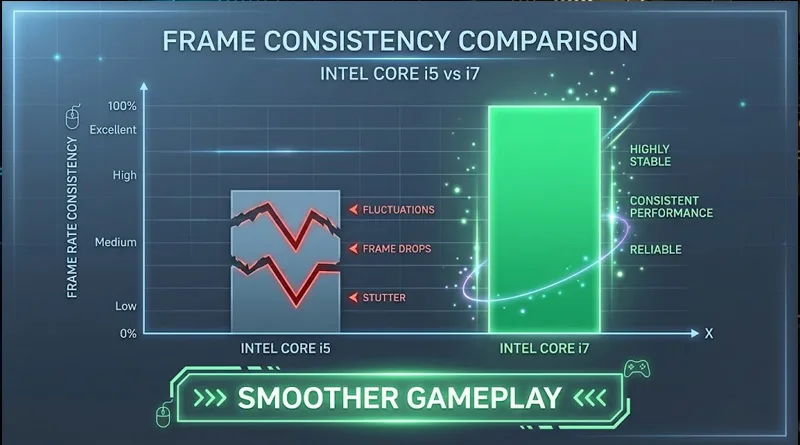
- The i5 Experience: You might average 144 FPS, but during a massive explosion or a smoke grenade, your frames drop to 60 for a split second. That is a “stutter.”
- The i7 Experience: Because of the higher clock speeds and extra cache, the i7 keeps those 1% lows higher—perhaps staying at 90 or 100 FPS during that same explosion.
In the intel i5 vs i7 for gaming showdown, the i7 wins on smoothness. If you are playing on a Best 1440p Gaming Monitor, you want the most stable frame delivery possible to match your high refresh rate.
3. The Streaming Bottleneck: Intel i5 vs i7 for Gaming and Content Creation
Are you a “Pure Gamer” or a “Creator”? This is where the intel i5 vs i7 for gaming decision becomes easy.
The “Overhead” Test
If you play with Discord open, 20 Chrome tabs in the background, and OBS streaming your gameplay to Twitch, the i5 will struggle. You will notice “input lag” or dropped frames in your stream.
- The i7 Solution: The extra Efficiency cores on an i7 are designed to handle these background tasks, leaving the Performance cores free to run the game.
If you are serious about your broadcast, don’t just upgrade your CPU. Ensure your network is ready by reading: Does Upload Speed Affect Gaming and Streaming?.
4. Hidden Costs: Cooling and Motherboard VRMs
When comparing intel i5 vs i7 for gaming, the price of the chip is only part of the story.
The Heat Factor
An i5 can be cooled by a $35 air cooler. An i7, however, is a furnace. In 2026, to get the advertised speeds from an i7, you realistically need a 240mm or 360mm AIO liquid cooler. This adds another $100 to your build cost.
The Motherboard Factor
The i7 draws significantly more power. If you put an i7 on a cheap, budget motherboard, the VRMs (Voltage Regulator Modules) will overheat and throttle your CPU.
Before buying an i7, make sure your board can handle it. See our guide: Motherboard VRMs Explained: The Secret to Stability.
5. Decision Matrix: Is the $100 Upgrade Worth It?
To help you take action today on the intel i5 vs i7 for gaming choice, use this simple checklist:
- Buy the i5-14600K if: You only play games, you are on a budget, and you prefer 1080p or 1440p resolution.
- Buy the i7-14700K if: You stream to Twitch, you do video editing, or you play CPU-heavy simulators (Sims, Flight Sim, Cities: Skylines 2).
- Skip both if: You are gaming at 4K. At 4K, the GPU is the bottleneck, and the intel i5 vs i7 for gaming performance difference is nearly 0%.
At 4K, your money is better spent on storage speed. See the Best SSDs for Gaming in 2026.
Conclusion: Final Verdict on Intel i5 vs i7 for Gaming
The intel i5 vs i7 for gaming debate is no longer about which one is “better”—they are both incredible. The real question is: Will you actually use the extra power?
For 80% of gamers, the i5 is the smartest financial move. It allows you to put that extra $100 into a better graphics card, which will give you a much larger FPS boost than a CPU tier jump. However, if you are a “power user” who never closes a program and wants the smoothest possible frame delivery, the i7 is the ultimate peace of mind.
Make your choice based on your daily habits, not just the benchmarks. Pick your chip, install a Best Gaming Motherboard, and get into the game.
Compare i5-14600K vs i7-14700K Benchmarks on GamersNexus (YouTube)