

Let’s face it: spending 300 on a flag ship wireless headset is a luxury most gamers don’t need. As we move through the 2026 gaming seacon, the sub-100 price 100 price bracket has become the most competitive sector in the audio industry. Manufacturers are no longer giving you “cheap plastic garbage”; instead, they are competing to offer the Best Gaming Headset Under $100 by trickling down premium features like memory foam ear pads, spatial audio, and robust metal frames.
Finding the Best Gaming Headset Under $100 is about identifying the “Value Sweet Spot.” At this price point, you must make a choice: do you want the convenience of budget wireless, or the superior sound quality and durability of a wired connection? This guide provides an actionable, direct comparison of the top five headsets dominating the double-digit market today. To see how these compare to the absolute top-tier models, refer to our comprehensive Ultimate Guide to the Best Gaming Headset in 2026.
1. Top 5 Best Gaming Headset Under $100 Rankings (2026 Picks)
We have evaluated these options based on build quality, audio positioning, and mic clarity to find the definitive best gaming headset under $100 for your setup.
1. The Undisputed Value King: HyperX Cloud III (Wired)
If you want a headset that will last for years, this is the best gaming headset under $100. The Cloud III builds on the legendary comfort of the Cloud II, featuring a full aluminum frame, plush red memory foam, and custom-tuned 53mm angled drivers.
- Action Feature: It offers plug-and-play DTS Headphone:X Spatial Audio via its USB dongle.
2. The Comfort Champion: SteelSeries Arctis Nova 1 (Wired)
Weighing in at just 236 grams, this is the best gaming headset under $100 for those who hate heavy gear. It uses the modern “Nova” design, featuring AirWeave memory foam ear cushions and a fully retractable clearcast microphone.
- Action Feature: Fully compatible with the SteelSeries Sonar Audio Suite, allowing you to use pro-grade parametric EQ on PC.
3. The Esports Specialist: Razer BlackShark V2 X
This is the best gaming headset under $100 for competitive shooter fans who want maximum passive noise isolation. It features Razer’s TriForce 50mm drivers and a highly sensitive cardioid microphone.
- Action Feature: The thick, leatherette ear cushions provide an incredible physical seal, blocking out the sound of your loud mechanical keyboard.
4. The Wireless Value Pick: Logitech G435 Lightspeed
If you absolutely demand a cordless setup, this is the best gaming headset under $100. It uses Logitech’s proprietary Lightspeed wireless protocol for near-zero lag and is incredibly lightweight.
- The Trade-off: The build is almost entirely plastic, and the sound quality is slightly thinner than the wired Cloud III.
- If you go wireless, pair this with our recommended Best Logitech Gaming Mouse for a matching setup.
5. The Audiophile Entry: Audio-Technica ATH-GDL3 (Open-Back)
If your primary goal is hearing the exact direction of footsteps, this is the best gaming headset under $100. It is an open-back design, providing a massive, natural soundstage.
- The Catch: It lets air and sound pass through, meaning you will hear your environment, and those around you will hear your game.
2. Wired vs. Wireless at the $100 Threshold: The Hard Truth
When searching for the best gaming headset under $100, the connection type dictates the quality of the internal components.
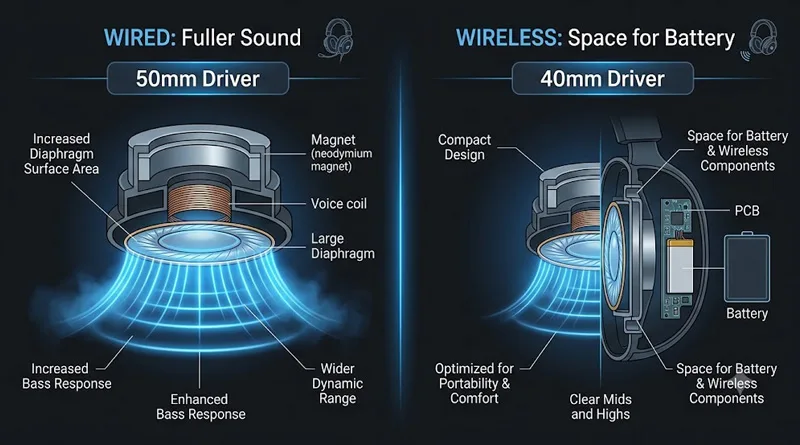
- The Wired Advantage (Best Sound): When a manufacturer doesn’t have to spend budget on batteries, wireless receivers, and digital-to-analog converters, they can spend that money on larger drivers (50mm+) and metal frames. A $90 wired headset will almost always sound better and last longer than a $90 wireless headset.
- The Wireless Advantage (Convenience): Wireless under $100 is possible, but you are paying for the convenience. You will often accept a more plastic-heavy build and smaller 40mm drivers.
If you choose wireless, ensure your network isn’t adding lag to your audio. See our guide on What is the Best Latency for Gaming? to keep your system clean.
3. Ergonomics and Clamping Force: Protecting Your Comfort
A budget headset should not mean budget comfort. In fact, comfort is a performance-critical specification.
The Clamping Force Trap
Cheaper headsets often use stiff, non-adjustable plastic headbands that apply too much “clamping force” to your skull, leading to headaches and neck fatigue.
- Action Tip: Look for headsets that feature a steel or aluminum headband (like the HyperX Cloud III). Metal headbands can be gently flexed to adjust the clamping force to your exact head size.
Physical comfort directly impacts your focus. Learn how to optimize your total posture in the Weight Gaming: Ultimate Ergonomics Guide.
4. Software Optimization: Making a $70 Headset Sound Like $200
The secret to maximizing the value of the best gaming headset under $100 is software. In 2026, free digital EQ tools can completely transform your audio.
The Sonar Hack (For PC Gamers)
You do not need an expensive SteelSeries headset to use their Sonar Software. It is completely free and works with any brand.
- Download SteelSeries GG and open the Sonar tab.
- Set your budget headset as the output.
- Load the specific game profile (e.g., Valorant or Apex Legends). This will automatically boost the exact frequencies of footsteps while muting low-end explosions, giving you a competitive edge for $0.
Running background audio software requires CPU headroom. Ensure your OS is optimized: How to Stop Antivirus From Dropping FPS.
Conclusion: Value is the Ultimate Winner
The search for the best gaming headset under $100 proves that you do not need to spend a fortune to be competitive in 2026. If you value raw durability and deep, rich sound, the HyperX Cloud III is the undisputed champion. If you prioritize lightweight comfort and pro-grade software tuning, the SteelSeries Arctis Nova 1 is your best bet.
Choose the headset that matches your platform, download your free EQ software, and get into the game. Your ears—and your wallet—will thank you. For more advice on the hardware that anchors your high-performance setup, check out our Best Gaming Motherboard of 2026 Guide.
Check out independent frequency response graphs on RTINGS.com