

In 2026, building or buying a brand-new desktop can be an expensive endeavor. For budget-conscious players, searching for a used gaming pc on local marketplaces, eBay, or refurbished retail outlets is the single most effective way to stretch your hard-earned dollar. A second-hand rig can often give you twice the performance per dollar compared to a new system at the same price point, allowing you to run modern titles without a massive financial investment.
However, the second-hand hardware market carries real risks. From crypto-mined graphics cards and failing power supplies to hidden thermal throttling, buying a used gaming pc requires a careful, methodical approach. This guide is an actionable blueprint. We break down the physical inspection checklist, the mandatory software stress tests you must run before handing over cash, and the red flags that signal a bad deal. If you decide that buying second-hand is too risky, compare these deals against our list of the Best Gaming PCs Under $600.
1. Physical Inspection: What to Check on a Used Gaming PC
Before you even plug a used gaming pc into the wall, a thorough physical inspection will reveal how the previous owner treated the system.
The Dust and Thermal Compound Test
Open the side panel and look at the heatsinks, fan blades, and dust filters. Light dust is normal for any system, but caked, sticky grime is a major red flag. Heavy dust buildup restricts airflow, forcing the CPU and GPU to run hot for years, which significantly degrades internal silicon.
- Action Tip: When inspecting second-hand hardware, check for dust buildup inside the fans. If the system is dusty but otherwise functional, you can easily restore it by following our beginner guide on How to Clean Your PC Without Breaking It
Check for GPU Sag and Capacitor Swelling
Look closely at the graphics card (GPU) and motherboard. Heavy graphics cards can bend the motherboard’s PCIe slot if not supported properly over time. Furthermore, look at the small cylindrical capacitors on the motherboard. If the tops are bulging, rusted, or leaking, the motherboard is near the end of its life.
2. Mandatory Software Stress Tests Before You Buy
Never buy a used gaming pc in a parking lot or without seeing it turn on and run under load. Request a 15-minute testing window at the seller’s location.
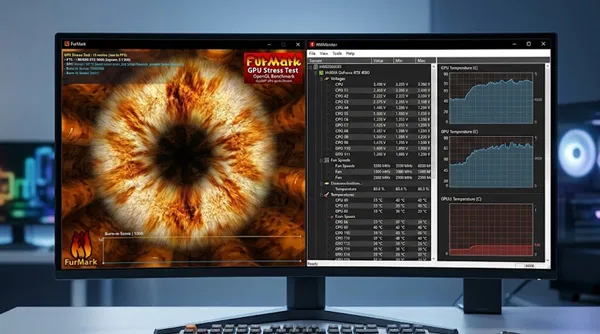
1. FurMark (The GPU Stress Test)
Run FurMark for at least 10 minutes and watch the temperature graph closely. A healthy GPU will level off between 65°C and 82°C. If the temperature spikes past 90°C instantly, or if the screen flickers with colorful dots (artifacts), the GPU thermal paste is completely dried out or the memory chips are failing.
- Action Tip: During your 15-minute FurMark test, watch the temperatures closely. If the CPU or GPU is running hot, refer to our troubleshooting steps on How to Stop PC from Overheating before handing over your cash.
2. CrystalDiskInfo (The SSD Health Check)
Bring a USB drive with the free portable software CrystalDiskInfo. Plug it in and open it. It reads the drive’s internal SMART data and displays a percentage health score. If it shows “Caution” or “Bad,” the storage drive is failing and must be replaced immediately.
3. Evaluating Older Parts: What is Still Good in 2026?
When evaluating the specs of a used gaming pc, knowing which older components still hold up is crucial.
Processors (CPUs)
- Good: Intel 12th Gen (i5-12400F) or newer, and AMD Ryzen 5000 Series (Ryzen 5 5600X) or newer. These use modern architecture and support high-speed DDR4 or DDR5 RAM.
- Avoid: Intel 8th Gen or older (quad-cores), and AMD FX-series processors. They cannot handle modern multi-threaded games.
Wondering if an older Intel chip can handle modern games? Read our deep-dive: Is Intel Core i5 Good for Gaming in 2026?.
Pre-Built Brands on the Second-Hand Market
Many second-hand systems on local marketplaces are older pre-builts from major manufacturers.
If you are comparing two popular second-hand pre-built brands, see our head-to-head review on CyberPowerPC vs iBuyPower.
4. Refurbished vs. Local Marketplace: Where to Buy
Where you purchase your used gaming pc dictates your safety net and warranty.
Facebook Marketplace / Craigslist (Lowest Price, Highest Risk)
- Pros: The absolute cheapest deals. Sellers often accept low offers to clear space.
- Cons: Zero warranty, zero returns, and high risk of hidden issues. “As-is” sales mean once you hand over the money, you have no recourse.
Amazon Certified Refurbished / eBay Refurbished (Slightly Higher Price, Low Risk)
- Pros: Includes a 90-day to 1-year warranty, money-back guarantees, and professional cleaning/testing by certified technicians.
- Cons: Costs 10-20% more than local private sellers.
If you decide that buying a second-hand PC carries too much risk, we recommend reading our master guide on What to Look For When Buying a Pre-built Gaming PC before shopping for a new system.
5. The #1 Mandatory Upgrade for a Used Gaming PC
Even the best second-hand deal will often ship with an old, slow mechanical hard drive (HDD) or a tiny 256GB boot drive.
Upgrade the Storage Immediately
The first thing you should do after buying a used gaming pc is wipe the operating system completely (to ensure no malware remains from the previous owner) and install a fresh, high-speed NVMe SSD. An SSD transforms a sluggish second-hand system into a fast, responsive machine that boots Windows in seconds.
Don’t let an old drive bottleneck your second-hand system. See our picks in The 4 Best SSDs for Gaming in 2026.
Conclusion: Value Belongs to the Prepared Buyer
Buying a used gaming pc in 2026 is one of the smartest financial moves a gamer can make, provided you approach the deal with caution and the right diagnostic tools.
Inspect the physical hardware for dust and sag, run a 10-minute FurMark stress test, check the SSD health, and wipe the system clean before logging into your personal accounts. With the right preparation, you can enjoy high-FPS gaming for a fraction of retail cost.
Download portable FurMark and CrystalDiskInfo diagnostic tools