

When buying a mechanical keyboard, the most critical decision isn’t the RGB lighting or the wireless connectivity—it is the small mechanism under every single keycap. The debate over linear vs tactile vs clicky switches dictates how your keyboard feels, how loud it sounds, and how fast your keystrokes register in-game. Picking the wrong switch can result in tiring finger fatigue or a keyboard so noisy it disrupts your Discord voice calls.
Whether you are looking at budget choices like our picks for the Best Mechanical Gaming Keyboards Under $100 or browsing wireless options from our list of the Best Logitech Wireless Keyboards, understanding switch characteristics is essential. This guide provides a direct, technical breakdown of linear vs tactile vs clicky switches, helping you match the right switch type to your gaming style and typing habits.
1. Linear Switches (Red/Yellow): The Smooth FPS Standard
Linear switches are the default recommendation for competitive gamers, offering a smooth, uninterrupted keypress from top to bottom.
How Linear Switches Work
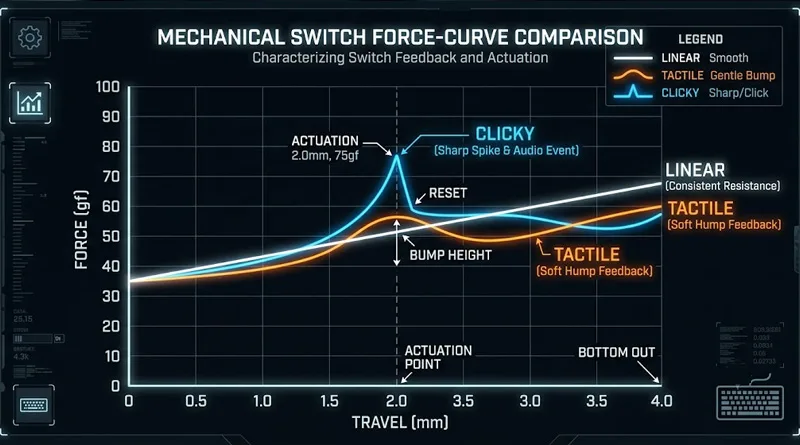
There is no bump, resistance, or audible click during the key travel. You press the key down, it hits the actuation point, and it bottoms out in one smooth motion.
Why Gamers Love Linear
- Maximum Speed: Without a physical bump in the key travel, linear switches allow for rapid double-taps and fast direction changes in games like Valorant or Apex Legends.
- Quiet Operation: They are significantly quieter than clicky options, making them ideal for shared spaces or streaming setups.
- Popular Examples: Cherry MX Red, Gateron Red, Razer Yellow.
In the linear vs tactile vs clicky switches discussion, linear switches win for pure, friction-free competitive speed.
2. Tactile Switches (Brown/Clear): The Balanced All-Rounder
Tactile switches offer a middle ground, providing physical feedback without the loud noise of a clicky switch.
How Tactile Switches Work
As you press the key down, you feel a subtle “bump” roughly halfway through the travel distance. This bump lets your fingers know that the keypress has registered without needing to press the key all the way down (bottoming out).
Why Gamers Love Tactile
- Typing Accuracy: The physical bump helps prevent accidental keypresses, making tactile switches the preferred choice for people who use their PC for both typing and gaming.
- Controlled Feedback: Gives satisfying physical confirmation during complex key combos in MOBAs or strategy games.
- Popular Examples: Cherry MX Brown, Gateron Brown, Boba U4T.
If you divide your time equally between gaming and writing, the linear vs tactile vs clicky switches choice leans heavily toward tactile options.
3. Clicky Switches (Blue/Green): Maximum Feedback and Sound
Clicky switches are designed for maximum sensory engagement, producing both a physical bump and an audible “click” sound when pressed.
How Clicky Switches Work
Inside the switch, a small floating “click jacket” or metal leaf snaps down when the key reaches its actuation point, creating a sharp, crisp sound alongside a pronounced tactile bump.
The Trade-Offs for Gaming
- Pros: Incredibly satisfying typing feel and unmistakable confirmation that a command has been registered.
- Cons: The loud click is easily picked up by open microphones, which can annoy teammates on Discord or streams. They also have a slightly slower reset time compared to linear switches.
- Popular Examples: Cherry MX Blue, Razer Green, Gateron Melodic Clicky.
If you use clicky switches, a microphone with good background noise rejection is essential. See our guide on USB vs XLR Mic for Gaming [LINK TO USB VS XLR MIC POST to keep your Discord audio clean.
4. Beyond Linear vs Tactile vs Clicky Switches: Magnetic and Optical Tech in 2026
While traditional mechanical switches remain popular, the linear vs tactile vs clicky switches conversation in 2026 now includes Rapid Trigger (Magnetic) and Optical technology.
Magnetic / Hall Effect Switches
Instead of physical metal contacts, magnetic switches (like those found in Wooting or SteelSeries Apex Pro keyboards) use sensors to measure key depth.
- Rapid Trigger Advantage: You can set the key to reset the instant it moves upward by a fraction of a millimeter, allowing for faster inputs than any traditional mechanical switch.
Optical Switches
Optical switches use a beam of light inside the switch to register the keypress, offering near-instant response times and higher overall durability.
5. Decision Matrix: Which Switch Should You Buy?
Use this quick guide to choose your ideal switch type in the linear vs tactile vs clicky switches lineup:
- Choose Linear (Red/Yellow) if: You primarily play FPS games, want the fastest input registration, and prefer a quiet keyboard.
- Choose Tactile (Brown) if: You split your time between gaming and typing, and you want physical confirmation without loud noise.
- Choose Clicky (Blue) if: You love loud, retro typing feedback and don’t mind the noise on open microphones.
Conclusion: Matching Your Switches to Your Gear
Understanding linear vs tactile vs clicky switches removes the guesswork from buying a mechanical keyboard. Your choice directly influences your comfort, typing speed, and gaming responsiveness.
Once you have selected your ideal switch type, explore our curated lists in The 5 Best Mechanical Gaming Keyboards Under $100 or step up to high-end builds in The Best Premium Gaming Peripherals to complete your setup.
Switch Lubing and Sound Dampening: The Custom Touch
Understanding linear vs tactile vs clicky switches is only part of the sound story. Many keyboard enthusiasts take their setup a step further by “lubing” their switches.
- Lubing Linear Switches: Applying a thin layer of specialized lubricant (like Krytox 205g0) to a linear switch removes scratchiness and creates a deep, thocky sound profile.
- Lubing Tactile Switches: Requires precision. You must avoid lubing the tactile legs, or you will accidentally erase the physical bump that defines the switch feel.
- Lubing Clicky Switches: Never lube the click jacket inside a clicky switch. Doing so will deaden the click mechanism and turn it into a mushy, inconsistent mess.
Test mechanical switch sound profiles on KeyboardTester.com