

You’ve decided to stop using your “crunchy” headset microphone and move into the world of professional audio. But as soon as you start browsing, you hit the most debated topic in streaming: USB vs XLR Mic for Gaming. In 2026, the gap between these two technologies has narrowed in terms of sound, but the difference in cost, flexibility, and “headache-factor” remains massive.
Finding the Best Gaming Mic is only half the battle. The other half is choosing the ecosystem you want to live in. Are you a “plug-and-play” creator who wants to go live in five minutes, or are you an enthusiast who wants to tweak every frequency of your voice? This guide breaks down the USB vs XLR Mic for Gaming debate with actionable data so you can spend your budget wisely.
1. The USB Advantage: Simplicity and Software
For the vast majority of beginners, a USB microphone is the logical starting point in the USB vs XLR Mic for Gaming journey.
Plug-and-Play Power
The beauty of a USB mic is that the “audio interface” is built directly into the microphone. You plug it into a port, Windows recognizes it, and you’re done. In the USB vs XLR Mic for Gaming comparison, USB wins on convenience every single time.
Integrated Digital Mixing
In 2026, brands like Elgato and SteelSeries have mastered the software side. When you buy a USB mic, you often get access to a digital mixer (like Wave Link). This allows you to route your game audio, Spotify, and Discord through the mic software without buying a physical mixing board. For a solo streamer, this makes USB vs XLR Mic for Gaming a one-sided fight in favor of USB.
The Limitation
You cannot easily upgrade a USB mic. If you want a better sound later, you have to buy a completely new microphone. You are also limited by the length of a USB cable, which can occasionally introduce electrical “hum” from your PC.
2. The XLR Advantage: The Pro “Signal Chain”
If you see a pro-gamer with a massive, heavy-duty microphone on a boom arm, they are likely using an XLR setup. This is the “End Game” of the USB vs XLR Mic for Gaming debate.
Pure Analog Quality
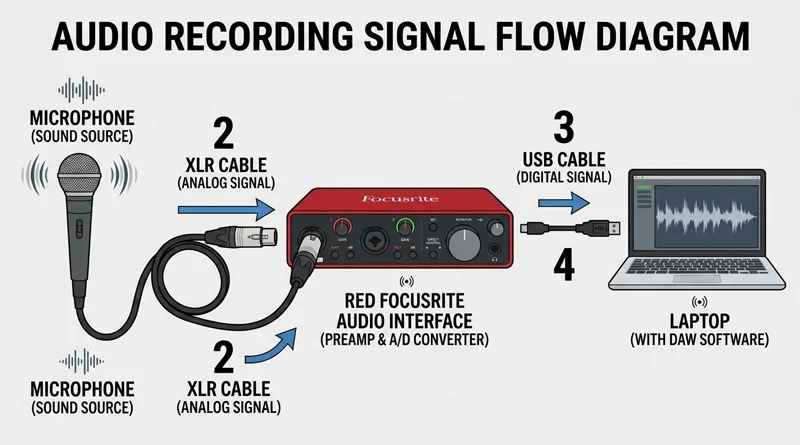
XLR microphones send an analog signal to a dedicated device called an Audio Interface. Because the conversion from analog to digital happens outside the microphone in a specialized box, the sound is often warmer, cleaner, and more professional. When people talk about “radio voice,” they are usually describing an XLR setup.
Total Hardware Control
With an XLR USB vs XLR Mic for Gaming setup, you have physical knobs to turn. You can adjust your “Gain” (volume) on the fly without Alt-Tabbing out of your game. You can also swap out different microphones while keeping the same interface, or upgrade your interface while keeping your favorite mic. This modularity is why enthusiasts choose XLR.
3. The “Hidden Costs” of USB vs XLR Mic for Gaming
This is where beginners often get “sticker shock.” When comparing the price of a USB vs XLR Mic for Gaming, you must look at the total “Chain.”
| Component | USB Setup Cost | XLR Setup Cost |
| Microphone | $50 – $160 | $100 – $400 |
| Cables | Included | $15 (XLR Cable) |
| Interface | $0 (Built-in) | $100 – $200 (Focusrite/Elgato) |
| Pre-amp | $0 | $100 (Optional: Cloudlifter) |
| TOTAL | $50 – $160 | $315 – $715+ |
As the table shows, the USB vs XLR Mic for Gaming choice isn’t just about the mic; it’s about the $200+ of extra gear required to make an XLR mic talk to your computer. If you are on a budget, USB is the undisputed king.
4. Technical Performance: Jitter, Latency, and Power
Does your choice of USB vs XLR Mic for Gaming affect your PC performance or network?
CPU Overhead
USB microphones rely on your PC’s CPU to process the audio. In modern 2026 systems, this is negligible. However, an XLR interface handles the processing itself, technically freeing up a tiny bit of CPU power for your game’s frame rate.
If you are obsessed with every single frame, ensure your background security isn’t also eating your CPU. See: How to Stop Antivirus From Dropping FPS.
The Network Factor
High-quality audio requires “headroom” in your internet connection. If you are using an XLR setup at maximum bit-depth, you are sending a lot of data.
Don’t let your high-end audio setup cause lag. Check if your connection can handle the load: Is 300 Mbps Good for Gaming and Streaming?.
5. Posture and Ergonomics: The Boom Arm Rule
Whether you choose USB vs XLR Mic for Gaming, the most common mistake is leaving the mic on its “included” desk stand.
Why Desk Stands Fail
A mic on your desk is too far from your mouth. You have to turn up the gain, which means the mic will pick up your keyboard clicks and the vibrations from your mouse.
- Action Plan: Always budget for a Boom Arm. It allows you to bring the mic 2-3 inches from your mouth, allowing you to lower the gain and sound like a pro.
Proper mic placement is also about neck health. Learn more in The Ultimate Healthy Gaming Setup Guide.
Conclusion: Which Should You Buy?
The USB vs XLR Mic for Gaming decision comes down to your “Action Path”:
- Choose USB if: You are a beginner, a solo gamer, or a streamer who wants a simple, high-quality setup for under $150. You value software control and space-saving.
- Choose XLR if: You are an aspiring professional, you record podcasts with multiple people, or you love the aesthetic and “feel” of physical audio hardware. You have a budget of $300+.
The bottom line for 2026: A high-end USB mic sounds better than a cheap XLR setup. Don’t buy XLR just for the “look”—buy it because you want the control.
Watch “How to set up an XLR Mic” tutorial