
A great gaming PC and a supportive chair are only the beginning. To truly achieve a performance-focused, injury-preventing environment, you need the ultimate healthy gaming setup. This involves optimizing every piece of hardware—your desk, monitor, keyboard, and mouse—to conform to your body, not the other way around. Building the ultimate healthy gaming setup is the practical application of the weight gaming philosophy, turning the concept of long-term health into an actionable design plan. This guide provides a detailed, step-by-step blueprint for the ultimate healthy gaming setup, ensuring every component is placed at the perfect ergonomic height and distance to eliminate strain and fatigue.
For the essential first step, consult our guide on chair selection or our comprehensive guide on weight gaming principles.
1. The Foundation: The Ergonomic Desk for The Ultimate Healthy Gaming Setup
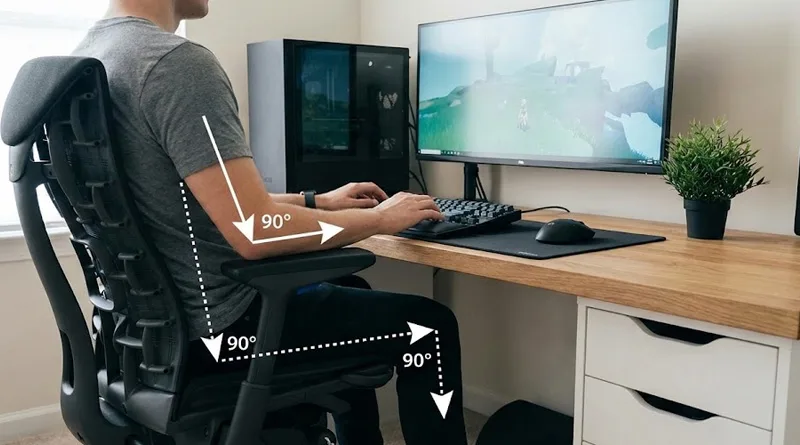
The desk is the second most important piece of hardware after the chair. It must be adjustable to allow you to maintain the critical 90/90/90 Rule.
The Desk Height Imperative
Your chair is adjustable, but if your desk is not, you will inevitably compromise your shoulder and elbow posture.
- The Problem: A fixed-height desk is only correct for one sitting height. Adjusting your chair to fit the desk often leaves your feet dangling or your knees too high.
- The Solution: A Standing Desk (Electric Sit/Stand Desk) is the ultimate investment. It allows you to set your desk height precisely for sitting, standing, and various chair heights.
The 90/90/90 Rule Breakdown
The best healthy gaming setup achieves three 90-degree angles:
- Elbows: Forearm parallel to the desk. This takes stress off the neck and shoulders.
- Hips: Thighs parallel to the floor. This minimizes pressure on the lower back.
- Knees: Feet flat on the floor (or footrest). This ensures proper blood flow.
Recommended Desks
- Top Pick: A full 72-inch wide electric standing desk (e.g., Uplift, Fully, or quality autonomous brands) with a large surface area for freedom of movement.
- Budget Pick: A static desk with height-adjustable legs, paired with an ergonomic footrest for knee/hip alignment.
2. Monitor Placement: Eliminating Neck and Eye Strain
The monitor is the source of both neck strain and eye fatigue. Correct placement is a non-negotiable step in building the ultimate healthy gaming setup.
The Eye Level Rule
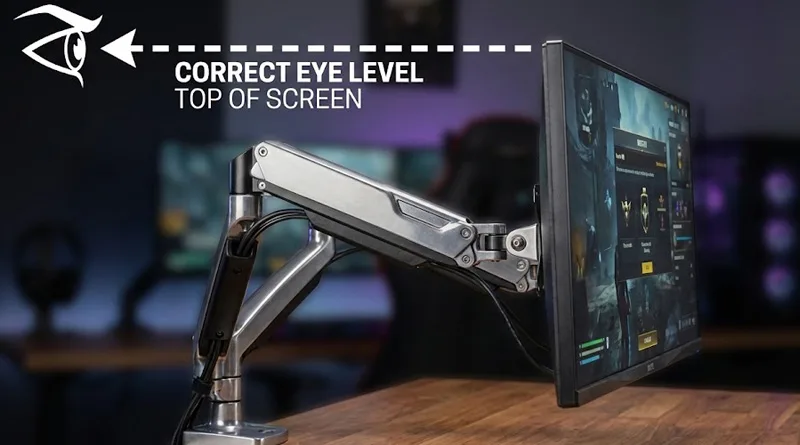
- Height: The top bezel (the very top edge) of your monitor should be at or slightly below your natural eye level when you are looking straight ahead. This prevents you from tilting your head upward, which causes long-term neck strain.
- Distance: The monitor should be approximately arm’s length away from your face.
The Monitor Arm Advantage
A monitor arm (gas spring or mechanical) is the most effective way to meet the Eye Level Rule, especially if you have multiple screens or use a standing desk.
- Function: Monitor arms allow you to adjust the height, depth, and angle of your screen in seconds. When you stand up, you simply pull the monitor up to your standing eye level.
- Affiliate Opportunity: This is a fantastic affiliate item. Look for arms rated for the weight of your gaming monitor (e.g., 34-inch ultrawides need heavy-duty arms).
Recommended Monitor Arms
- Top Pick: A heavy-duty, gas-spring monitor arm (e.g., Ergotron HX or an equivalent Amazon Basics Heavy Duty Arm) for fast, smooth one-handed adjustments.
3. Peripheral Placement: Protecting Your Hands
The keyboard and mouse are the direct link between your intent and the game. Poor placement here leads to Carpal Tunnel Syndrome and other chronic injuries.
The Keyboard and Mouse Placement Rule
Your peripherals should be positioned so that your wrists are straight, neutral, and flat relative to your forearms.
- Recommendation: Use a negative tilt tray or a slightly raised wrist rest to ensure your hands are level. Never let your wrists bend upward on the desk surface.
- Affiliate Opportunity: Link to ergonomic split keyboards (e.g., Kinesis) or dedicated gaming wrist rests (e.g., HyperX, Glorious).
The Ergonomic Mouse
Traditional gaming mice are designed for speed, not ergonomics. The ultimate healthy gaming setup incorporates a mouse that fits the curvature of your hand.
- Recommendation: For non-competitive play, consider a vertical ergonomic mouse. For competitive play, choose a gaming mouse that supports your full palm to prevent “claw grip” strain.
Conclusion: Making Performance Sustainable
Building the ultimate healthy gaming setup is the best defense against fatigue and injury. By implementing the 90/90/90 Rule with a quality ergonomic chair and a sit/stand desk, and by ensuring your monitor is perfectly positioned, you make your passion sustainable.
This holistic approach is the final, most crucial step in the weight gaming philosophy it transforms an expensive collection of hardware into a personalized, high-performance command center.