
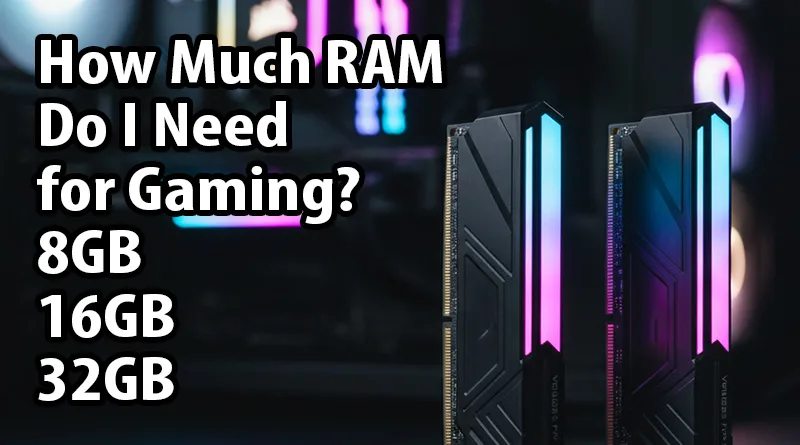
hen building or upgrading a gaming PC, one of the most common questions that arise is: How much RAM do I need for gaming? It’s a critical component often overlooked, yet it plays a pivotal role in the smoothness and responsiveness of your gaming experience. While CPUs and GPUs often steal the spotlight, sufficient RAM (Random Access Memory) ensures your system can juggle multiple tasks, load game assets quickly, and prevent frustrating stutters. For a complete overview of all the components that make a great gaming machine, check out our comprehensive guide: The Ultimate Guide to the Best Gaming PCs.
This comprehensive guide will explain the different RAM capacities—8GB, 16GB, and 32GB—and help you determine the optimal amount for your gaming habits, budget, and future needs.
Before diving into specific capacities, let’s briefly understand what RAM does for gaming. RAM acts as your computer’s short-term memory, storing data that your CPU needs to access quickly. When you launch a game, its core files and assets are loaded into RAM. The more complex the game, or the more applications you run in the background (like Discord, Twitch, or a web browser), the more RAM your system will utilize. Insufficient RAM can lead to slow loading times, reduced frame rates, and even game crashes. So, understanding how much RAM do I need for gaming is paramount for a seamless experience.
Understanding RAM Capacity: 8GB for Gaming
For many years, 8GB of RAM was considered the standard for gaming. Today, it’s often seen as the absolute minimum, and for a good reason. While 8GB can still run many older or less demanding modern titles, it frequently struggles with newer AAA games, especially when combined with background applications.
Pros of 8GB RAM:
- Cost-Effective: It’s the cheapest option, making it suitable for budget builds or very casual gamers.
- Basic Gaming: Can handle older e-sports titles (CS:GO, League of Legends, Valorant) and some less graphically intensive indie games without major issues.
Cons of 8GB RAM:
- Limited Multitasking: Running a game, Discord, a web browser with multiple tabs, and other utilities simultaneously will quickly max out your RAM, leading to slowdowns and stutters.
- Struggles with Modern AAA Games: Many new releases explicitly recommend 16GB of RAM. With 8GB, you’ll likely experience frame drops, longer loading screens, and potentially even crashes in demanding titles.
- No Future-Proofing: As games become more complex, their RAM requirements will only increase. An 8GB setup will be obsolete for new games much sooner.
Who is 8GB RAM for?
If you’re on an extremely tight budget, play only older or very light indie games, and don’t multitask heavily while gaming, 8GB might barely suffice. However, for anyone serious about modern gaming, how much RAM do I need for gaming quickly points away from 8GB.
Understanding RAM Capacity: 16GB for Gaming (The Current Sweet Spot)
Currently, 16GB of RAM is widely considered the sweet spot for gaming. It strikes an excellent balance between performance and cost, offering enough headroom for almost all modern AAA titles and comfortable multitasking.
Pros of 16GB RAM:
- Excellent Gaming Performance: 16GB handles nearly all current AAA games with ease, providing smooth frame rates and reasonable loading times.
- Comfortable Multitasking: You can typically run your game, Discord, a streaming application, and several browser tabs without experiencing significant performance degradation.
- Good Value: The price difference between 8GB and 16GB isn’t as significant as it used to be, making 16GB a much better investment for the performance boost it offers.
- Future-Proofing (Short to Medium Term): 16GB will likely remain sufficient for new games for the next few years, offering a good degree of future-proofing.
Cons of 16GB RAM:
- Can be Challenged by Extreme Use: If you’re running extremely RAM-hungry applications (e.g., video editing, 3D rendering) while trying to game, or if you have dozens of browser tabs open in the background alongside a particularly demanding game, you might occasionally brush against its limits. This scenario is rare for most dedicated gamers, however.
Who is 16GB RAM for?
This is the recommended amount for the vast majority of gamers. If you want a smooth experience across the board, play a variety of games from competitive e-sports to graphically intense single-player adventures, and like to have background apps running, then 16GB is the answer to how much RAM do I need for gaming.
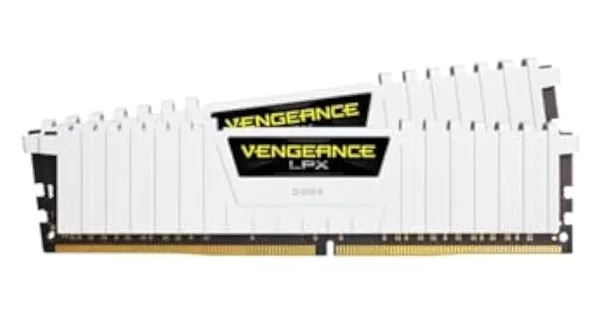
- Our Top Pick for 16GB Gaming RAM:
- CORSAIR Vengeance LPX 16GB (2 x 8GB) DDR4 DRAM 3200MHz C16 (or similar speed/brand that you’ve had success with, like G.SKILL Trident Z5)
- Consider linking to a slightly faster 3600MHz kit if within budget for AMD Ryzen users.
Understanding RAM Capacity: 32GB for Gaming (The Enthusiast’s Choice)
While 16GB is sufficient for most, 32GB of RAM is becoming increasingly popular among enthusiasts, streamers, content creators, and those who simply want absolute peace of mind for the future. While it doesn’t offer a direct performance doubling over 16GB in games, it provides immense overhead for demanding workflows.
Pros of 32GB RAM:
- Ultimate Multitasking: Run any game, stream in high quality, have multiple browser windows open, edit videos, and run virtual machines all simultaneously without any RAM bottlenecks.
- Future-Proofing (Long Term): 32GB ensures you’re well-prepared for any increased RAM demands from games or applications for many years to come. It’s the definitive answer to how much RAM do I need for gaming if you want to eliminate RAM as a concern entirely.
- Content Creation & Professional Work: If your PC doubles as a workstation for video editing, 3D rendering, graphic design, or heavy coding, 32GB is highly recommended.
- Minimal Swapping: With ample RAM, your system rarely needs to use slower storage (SSD/HDD) as virtual memory, keeping everything feeling snappier.
Cons of 32GB RAM:
- Higher Cost: It’s a noticeable jump in price from 16GB, and for pure gaming, much of that extra capacity might go unused in current titles.
- Diminishing Returns for Pure Gaming: For just gaming, the real-world performance difference between 16GB and 32GB in terms of FPS is often negligible. The benefit is primarily in the background processes and peace of mind.
Who is 32GB RAM for?
This capacity is ideal for hardcore gamers, professional streamers, content creators who edit large video files, 3D artists, or anyone who simply wants to build an absolute top-tier system and never worry about RAM constraints. If you have the budget and engage in more than just gaming on your PC, then 32GB answers how much RAM do I need for gaming (and everything else).
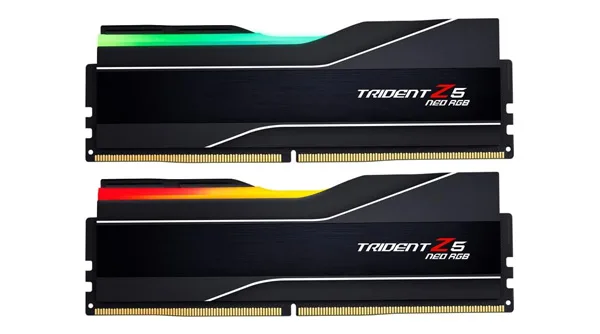
- Our Top Pick for 32GB Gaming RAM:
- G.SKILL Trident Z5 RGB 32GB (2 x 16GB) DDR5 DRAM 6000MHz CL30 (or a high-speed DDR4 kit if applicable to the user’s motherboard)
Other RAM Factors to Consider
Beyond just capacity, several other specifications influence RAM performance. When asking how much RAM do I need for gaming, it’s also about what kind of RAM.
1. RAM Speed (MHz)
RAM speed, measured in Megahertz (MHz), dictates how quickly your RAM can process data. Higher speeds generally translate to better performance, especially for CPUs like AMD’s Ryzen processors, which benefit significantly from faster memory.
- DDR4: For most modern DDR4 systems, 3200MHz to 3600MHz is the sweet spot for performance and value.
- DDR5: With the advent of DDR5, speeds start much higher, typically from 4800MHz upwards, with 6000MHz+ being ideal for gaming.
2. RAM Latency (CL – CAS Latency)
Latency, often denoted as “CL” (CAS Latency), refers to the delay between when the CPU requests data from RAM and when the RAM provides it. Lower CL numbers are better. For example, CL16 at 3200MHz is generally better than CL18 at 3200MHz. Always try to balance speed and latency; a slightly slower speed with much tighter timings can sometimes outperform a faster speed with very loose timings.
3. Single Channel vs. Dual Channel
This is a crucial, often overlooked, aspect. Most modern motherboards support dual-channel memory. This means installing RAM in pairs (e.g., two 8GB sticks for 16GB total) allows the CPU to access memory simultaneously from both channels, effectively doubling the memory bandwidth.
- Always aim for dual-channel: Two 8GB sticks are vastly superior to one 16GB stick, even if the total capacity is the same. Check your motherboard manual for the correct slots to populate for dual-channel operation. Using mismatched sticks or incorrect slots can lead to single-channel performance, severely hindering your gaming experience.
4. DDR4 vs. DDR5
- DDR4: The previous generation, still very capable and found in many systems. Generally more affordable.
- DDR5: The newer standard, offering higher speeds and improved efficiency. Requires a compatible motherboard and CPU (e.g., Intel 12th Gen+ or AMD AM5 platform). While more expensive, it offers better future-proofing and higher theoretical bandwidth.
How to Check Your Current RAM
If you’re wondering how much RAM do I need for gaming and want to see what you already have, it’s easy:
- Windows: Press Ctrl + Shift + Esc to open Task Manager. Go to the “Performance” tab and click on “Memory.” You’ll see your total RAM, speed, and how many slots are used.
- MacOS: Click the Apple menu, select “About This Mac,” then go to “Memory.”
Upgrading Your RAM: What to Consider
Deciding to upgrade your RAM is a smart move if you’re experiencing performance bottlenecks. Here’s what you need to keep in mind:
- Motherboard Compatibility:
- RAM Type (DDR4/DDR5): Your motherboard supports only one type. You cannot mix DDR4 and DDR5.
- Maximum Capacity: Check your motherboard’s specifications for the maximum RAM it can handle (e.g., 64GB, 128GB).
- Maximum Speed: Your motherboard also has a maximum supported RAM speed. While faster RAM might work, it will downclock to the motherboard’s (or CPU’s) maximum supported speed.
- CPU Compatibility: Your CPU also has a maximum supported RAM speed and type. Ensure your new RAM doesn’t exceed this.
- Physical Space: If you have a large CPU cooler, ensure there’s enough clearance for taller RAM sticks with heat spreaders or RGB.
- Buy in Kits: Always buy RAM in matched kits (e.g., a 2x8GB kit for 16GB). This ensures compatibility and optimal dual-channel performance. Mixing different brands, speeds, or capacities can lead to instability.
Conclusion: How Much RAM Do I Need for Gaming?
To summarize how much RAM do I need for gaming:
- 8GB RAM: Bare minimum for very casual or older gaming. Not recommended for modern AAA titles or multitasking.
- 16GB RAM: The current sweet spot for most gamers. Excellent for all modern games and comfortable multitasking. This is our general recommendation.
- 32GB RAM: Ideal for enthusiasts, streamers, content creators, and those seeking ultimate future-proofing and heavy multitasking capabilities.
Ultimately, your ideal RAM capacity depends on your specific gaming habits, budget, and whether your PC serves other demanding purposes. For the best balance of performance and value, 16GB of fast, dual-channel RAM will serve most gamers exceptionally well. For those pushing the boundaries or diving into content creation, 32GB offers unparalleled headroom.