
For the highly technical user, a Virtual Machine (VM) represents the ultimate layer of security, privacy, and dedicated performance for gaming. While traditionally associated with developers and IT professionals, a VM can be configured to run a separate, clean operating system (OS) dedicated entirely to gaming. This ensures that a primary OS is never exposed to malware and that no background processes from the host OS interfere with frame rates.
If you are looking for the best virtual machine for gaming, you are aiming for peak resource allocation and complete peace of mind. This comprehensive guide breaks down the necessary hardware (GPU Passthrough), the optimal software (Hypervisors), and the key setup steps needed to achieve a lightning-fast, isolated gaming environment.
1. What is a Virtual Machine for Gaming? (The Core Concept)
A Virtual Machine is a computer file—an “emulated computer”—that behaves like a completely separate PC, running its own operating system (the “Guest OS”) inside your actual computer (the “Host OS”).
Why Use a VM for Gaming?
- Security: This is the primary reason. Any malware, virus, or security vulnerability encountered in the gaming VM is entirely isolated from your main Host OS (where your banking, personal files, and primary accounts reside). This adds an ultimate layer of defense against sophisticated threats.
- Performance Isolation: The VM is dedicated to the game, running a minimal OS with zero background bloat. Once configured with GPU Passthrough, it offers dedicated hardware performance without host OS interference.
- Operating System Isolation: Allows Linux or Mac users to run a dedicated Windows instance exclusively for playing PC games that are incompatible with their Host OS.
2. Hardware is Everything: GPU Passthrough (The Performance Key)
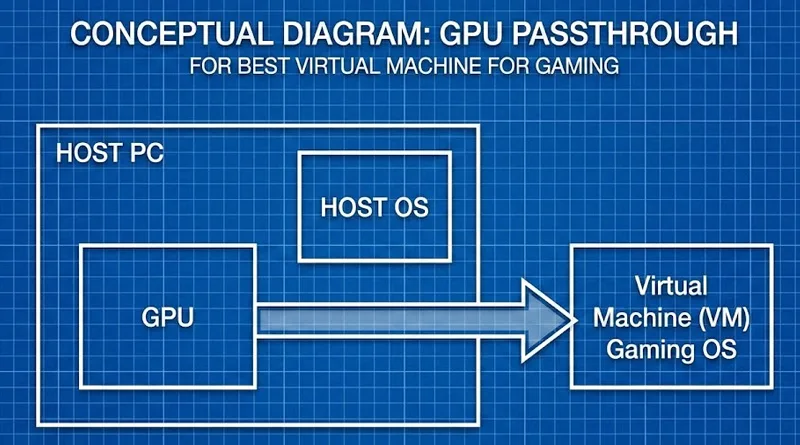
The biggest challenge in finding the best virtual machine for gaming is performance. Traditionally, a VM is too slow for gaming because it emulates the GPU. The solution is GPU Passthrough.
GPU Passthrough Explained
This advanced technique allows the Guest OS (the gaming VM) to bypass the Host OS entirely and take direct, exclusive control of a physical GPU installed in your computer.
- Result: The gaming VM performs at near-native speed, achieving high frame rates and eliminating the performance bottleneck traditionally associated with VMs.
The Dual GPU Requirement
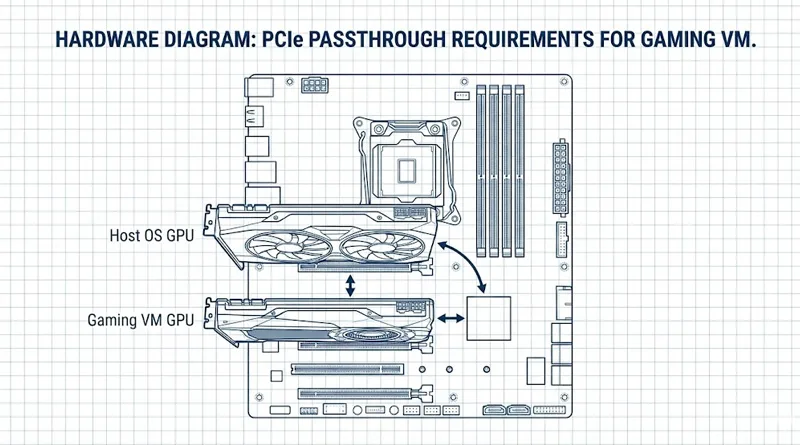
To use Passthrough, you need a system with two physical GPUs:
- GPU 1 (Host): A basic integrated or low-power card to run the Host OS (Windows/Linux).
- GPU 2 (Gaming VM): A powerful, dedicated gaming GPU (RTX 4080, RX 7900 XT, etc.) that is passed through to the VM.
[INSERT IMAGE HERE – Use Image Name: virtual-machine-gpu-passthrough-setup.jpg]
3. Top Hypervisors: Best Virtual Machine for Gaming Software
The Hypervisor is the software that manages the VM. Choosing the right one is critical for Passthrough support and stability.
1. KVM / QEMU (Linux Solution)
- Best For: Linux users. KVM (Kernel-based Virtual Machine) is the most powerful and flexible hypervisor for GPU Passthrough, offering the absolute highest level of performance control.
- Downside: Requires an advanced level of technical knowledge and command-line setup.
2. VMware Workstation / Player (Windows Solution)
- Best For: Windows users. VMware is the most user-friendly hypervisor, offering excellent stability and a graphical interface.
- Downside: Full GPU Passthrough is complex and often locked behind the expensive Workstation Pro version, making it less ideal for high-end gaming.
3. Microsoft Hyper-V (Windows Solution)
- Best For: Simple, built-in Windows virtualization. It’s pre-installed on Windows Pro/Enterprise versions.
- Downside: Supports Passthrough poorly. Excellent for basic tasks, but generally not recommended as the best virtual machine for gaming due to performance overhead.
4. The Security-Performance Tradeoff and Antivirus
Even with a dedicated VM, security remains paramount. The VM isolation protects the host, but the VM itself still needs defense.
VM Security and Antivirus
You must install a minimal, low-impact antivirus solution within the gaming VM. Since the VM runs fewer background tasks, a lightweight solution is ideal.
- Action: Choose a proven solution that respects frame rates, such as one of the top low-impact suites we reviewed. This pursuit of perfect performance without compromise is why security cannot be ignored.For the ultimate low-impact defense, consult our ultimate guide on the Best Antivirus for Gaming.
Performance-First PC Build
The entire VM setup relies on a powerful base system.
- Motherboard: Must support IOMMU virtualization technology and have multiple PCIe slots for the two GPUs.
- CPU/RAM: You must dedicate a large pool of CPU cores and at least 16GB of RAM to the VM.The foundation must be perfect. Ensure your rig is capable by reviewing the hardware standards in our guide: The Ultimate Guide to the Best Gaming PCs.
Conclusion: The Ultimate Dedicated Gaming Rig
The best virtual machine for gaming is not for the faint of heart, but it offers the ultimate setup for security, stability, and zero-compromise performance.
By dedicating a physical GPU to the virtual environment, you create an isolated, lightning-fast machine that eliminates OS bloat and provides a final layer of defense against security threats. This is the definition of dedicated performance for the most technically savvy and security-conscious gamers.