
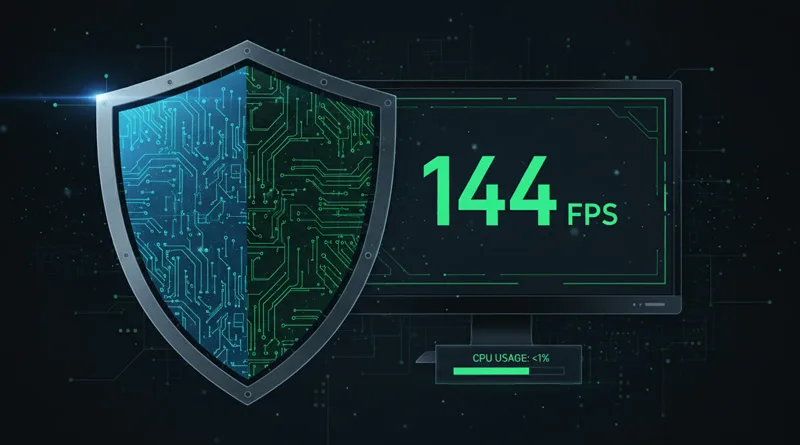
For the PC gamer, security is a non-negotiable requirement. Unfortunately, most traditional antivirus software is a performance killer, running aggressive background scans, popping up notifications during clutch moments, and consuming CPU cycles that should be dedicated to pushing high frame rates. The solution is finding the best antivirus for gaming—a suite specifically engineered to deliver maximum security with a minimum FPS impact.
This ultimate guide is the definitive resource for gamers who demand a seamless experience. We break down the top antivirus solutions that feature dedicated ‘Game Modes,’ analyze their real-world CPU usage, and review the essential security features that protect your valuable accounts without slowing down your machine. This is the only guide you need to secure your system with the best antivirus for gaming in 2026. Before diagnosing a software problem, you must ensure your network is stable. For a full breakdown of the basics, see our guide on what is ping in gaming.
1. Top 5 Best Antivirus for Gaming (2026 Rankings)
These products represent the pinnacle of security software that prioritizes a minimal system footprint, essential for competitive gaming.
1. Best Overall Low-Impact Choice: Bitdefender Total Security
- Key Feature: Known industry-wide for having the lightest performance footprint and the highest protection scores. Its proprietary Autopilot technology automatically detects when a game is running and minimizes all background processes without needing a manual “Game Mode” toggle.
- Game Mode: Fully automated and excellent at preventing interruptions.
2. Best for Advanced Gamers (Customization): Norton 360 Deluxe
- Key Feature: Norton’s ‘360’ branding emphasizes its comprehensive suite (VPN, Password Manager, Dark Web Monitoring). Its CPU usage is higher than Bitdefender, but its Norton Game Optimizer feature attempts to dedicate more resources back to the game process.
- Game Mode: Manual toggle with a powerful system optimization feature.
3. Best Value with Integrated VPN: Kaspersky Premium Security
- Key Feature: Consistently high marks in independent security testing and offers one of the best integrated VPNs for routing game traffic (which can reduce latency). Its system impact is moderate but well-managed by its automatic Game Mode.
- Game Mode: Excellent, manual switch that completely silences all notifications.
4. Best Free Option: Windows Defender
- Key Feature: It’s free and integrated into Windows. It has the lowest theoretical CPU overhead because it doesn’t run extra background services.
- Game Mode: None, but it respects the native Windows Focus Assist (Game Mode).
- Verdict: Sufficient for casual use, but lacks the deep, layered protection (ransomware defense, advanced phishing) of paid suites.
5. Best for Advanced System Cleanup: Avast / AVG
- Key Feature: Known for system tune-up tools and excellent quarantine features. Its system impact is heavy during scans, but its Game Mode is very aggressive at reducing CPU usage when activated.
- Game Mode: Excellent, but needs to be manually configured to optimize the aggressive scans.
2. Game Mode vs. Standard Mode: Why it Matters
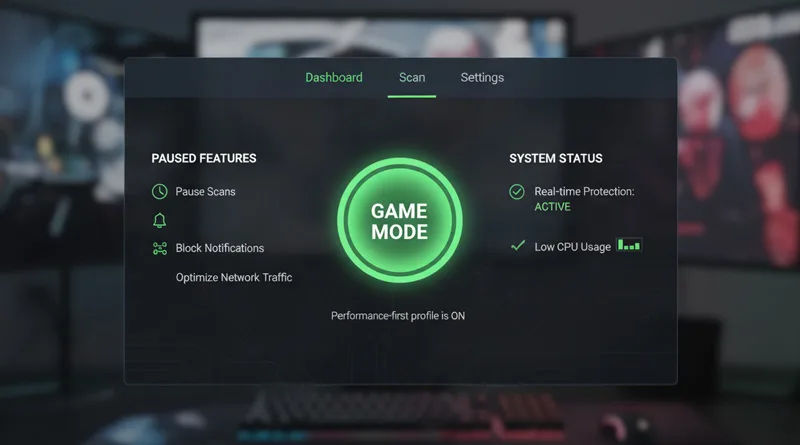
The single most important feature that qualifies a product as the best antivirus for gaming is its dedicated Game Mode. This function transforms the software from a system resource hog into a passive guard.
[INSERT IMAGE HERE – Use Image Name: antivirus-game-mode-toggle.jpg]
What Game Mode Actually Does
When you launch a game, the Game Mode automatically triggers several key actions:
- Pauses Scheduled Scans: Ensures a full system scan never kicks off mid-match, preventing massive FPS drops.
- Silences Notifications: Blocks all desktop pop-ups, ensuring your clutch moment isn’t ruined by a “Subscription Expiring Soon” window.
- Lowers Process Priority: The antivirus’s core defense processes are given the lowest possible CPU priority, dedicating resources back to your game.
Always verify that the antivirus you choose supports an active, automated Game Mode.
3. Beyond the Shield: Critical Security Features for Gamers
The best antivirus for gaming provides protection layers that extend beyond a simple virus scan, protecting your valuable accounts and digital wallets.
Phishing and Ransomware Defense
Gamers are high-value targets. A key feature is real-time anti-phishing protection (which prevents you from clicking malicious links sent over Discord or forums) and dedicated ransomware protection that locks your game files away from encrypting viruses.
Integrated VPN for Low Latency
A high-end security suite often includes a VPN (Virtual Private Network). While great for security, a VPN can also be used to route your game traffic around congested ISP nodes, potentially achieving better ping.
- Technical Advantage: The built-in VPN of a best antivirus for gaming is a powerful tool to eliminate latency caused by poorly-routed connections.
Password Manager and Wallet Protection
Gamers have numerous valuable accounts (Steam, Battle.net, Epic, PayPal). A strong, integrated password manager and secure browser extension that guards against keyloggers are essential features to protect against account theft.
4. The Performance Cost: Measuring FPS Impact
The question is not if an antivirus affects your FPS, but how much. Independent tests routinely show a range of system impact.
Benchmarks (The Proof)
- Low Impact (0-2% FPS Drop): Bitdefender, Windows Defender. These are virtually unnoticeable in most games.
- Moderate Impact (3-6% FPS Drop): Norton, Kaspersky. These drops are noticeable only on a competitive level and during resource-intensive system tasks.
To truly minimize FPS impact, ensure you have a dedicated Game Mode and manually exclude your primary game folders (Steam library, installation directory) from the real-time scanning feature.
5. Completing the Secure Setup
Security is a necessary layer over your physical hardware. You must choose a defense that works seamlessly with your high-performance rig.
Hardware Protection
The search for the best antivirus for gaming should not overshadow the protection of your physical hardware investment. A robust machine needs robust defense.
Just as you choose the right CPU and GPU, you must choose the right defense. For a full guide on building the ultimate performance machine, check out our resource: The Ultimate Guide to the Best Gaming PCs.
Ergonomic Protection
Protecting your physical health is just as important as protecting your game files. A proactive approach to health and performance is the only way to guarantee a long career in gaming.
A proactive approach to health and performance is the only way to guarantee a long career in gaming. For a look at optimizing your entire setup for long-term play, read our full guide on the weight gaming philosophy.
Conclusion: Security is a Performance Feature
The best antivirus for gaming is one that respects your frame rate. Traditional security software is an unacceptable liability for any serious player.
By choosing a suite with a proven low system footprint, a functional Game Mode to eliminate interruptions, and dedicated anti-phishing features to protect your accounts, you make security a performance feature. Don’t compromise your stability for protection. Choose one of our top-ranked solutions today.