

The logitech mx master series (anchored by the flagship MX Master 3S) is the undisputed #1 peripheral lineup for productivity, software development, video editing, and office ergonomics in 2026. Its electromagnetic MagSpeed scroll wheel, quiet acoustic clicks, and 8,000 DPI Darkfield glass-tracking sensor make it unbeatable for workflow efficiency. However, for fast-paced competitive esports (Valorant, Apex Legends), the series is fundamentally limited by its low 125Hz polling rate and heavy 141-gram weight; it handles casual strategy games and RPGs beautifully, but competitive shooter players should stick to Logitech G-Series mice like the Superlight 2.
For years, the standard computer mouse was treated as a disposable, generic accessory. The arrival of Logitech’s flagship office line completely redefined how professionals interact with digital workspaces. But with premium $100+ price tags and multiple models on the market, buyers on Reddit and online forums are constantly debating whether the logitech mx master series is truly worth the investment and whether one mouse can handle both work and evening gaming. This guide provides a direct, technical breakdown of the entire lineup, analyzes physical wrist ergonomics, and tests real-world gaming performance. To pair this mouse with a matching typing deck, explore our guide on The 4 Best Logitech Wireless Keyboards.
1. The Lineup Breakdown: Models in the Logitech MX Master Series
The logitech mx master series is not a single product; it is a specialized ecosystem designed for different workstation setups.
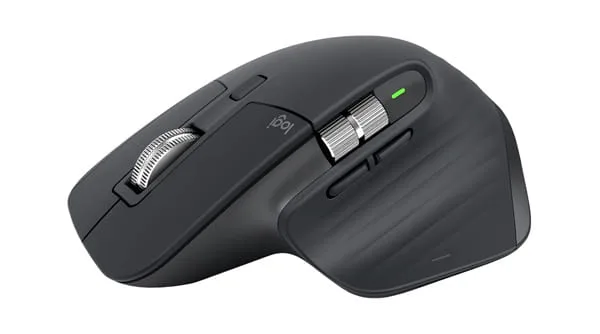
1. Logitech MX Master 3S (The Desk Flagship)
The centerpiece of the entire lineup. Designed specifically for full-sized desktop setups, it features a sculpted right-handed ergonomic body, a dedicated horizontal thumb wheel, and a hidden thumb-rest gesture button.
- Key Upgrade: The “3S” model introduced Quiet Click switches that reduce clicking noise by 90% while maintaining a crisp, tactile feel.
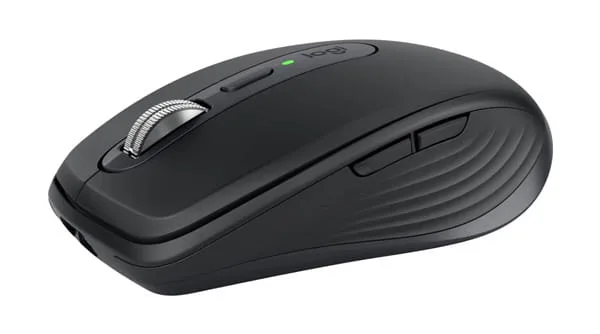
2. Logitech MX Anywhere 3S (The Mobile Warrior)
A scaled-down, ambidextrous version built for travelers, digital nomads, and smaller hands.
- The Advantage: It packs the same electromagnetic MagSpeed wheel and 8,000 DPI sensor into a pocketable chassis that weighs only 95 grams, making it the most portable logitech mx master series option.
3. Logitech MX Mechanical & MX Keys
The companion keyboards built to match the mouse hardware, featuring smart illumination backlighting that lights up the moment your hands approach the keys.
2. MagSpeed Scrolling: Why Creators Choose the Logitech MX Master Series
The single feature that makes the logitech mx master series impossible to abandon once you try it is the MagSpeed Electromagnetic Scroll Wheel.
1,000 Lines in One Second
Traditional mice use mechanical plastic gears to create scroll clicks. MagSpeed uses computer-controlled electromagnets.
- Ratchet Mode: Turn the wheel slowly, and magnetic pulses give you precise, line-by-line mechanical resistance.
- Free-Spin Mode: Flick the wheel hard, and the magnets deactivate instantly, letting the machined stainless steel wheel spin silently with zero friction. It can fly through 1,000 lines of code, massive Excel sheets, or long PDF documents in a single flick.
The Horizontal Thumb Wheel
Video editors working in Premiere Pro or DaVinci Resolve can use the metal thumb wheel to scroll horizontally along complex editing timelines with precision control.
3. The Reddit Dilemma: Can You Game on a Logitech MX Master Series Mouse?
The #1 question asked on Reddit forums like r/pcmasterrace is: “Can I use an MX Master for gaming so I don’t have to own two mice?”
The Technical Limitation: 125Hz Polling Rate
The logitech mx master series is engineered for battery life, not competitive esports. It transmits data to your PC at 125Hz (once every 8 milliseconds).
- The Gaming Problem: Dedicated gaming mice poll at 1,000Hz to 4,000Hz (once every 0.25 to 1 millisecond). In fast-paced FPS titles like Valorant or Counter-Strike 2, the 125Hz polling rate of the MX Master results in visible micro-stutters during rapid crosshair flicks.
- The 141-Gram Weight: At 141 grams, the MX Master 3S is more than double the weight of modern competitive mice (like the 60g Superlight 2), leading to wrist fatigue during fast sweeps.
Where It Excels in Gaming
If you play slower-paced games—such as Civilization VI, Baldur’s Gate 3, The Sims, Cities: Skylines, or MMOs—the logitech mx master series is fantastic. The ergonomic palm support and infinite scrolling make long strategy sessions exceptionally comfortable.
Looking for a pure high-speed mouse for competitive shooters? Read our ranked picks in 5 Best Logitech Gaming Mouse Options in 2026 .
4. Ergonomics and Wrist Health: The Natural Handshake Angle
Prolonged daily computer use is the leading cause of Carpal Tunnel Syndrome and wrist tendonitis. The physical design of the logitech mx master series is built around preventative ergonomics.
The 57-Degree Tilting Angle
A standard flat mouse forces your forearm into an unnatural “pronated” position (palm flat against the desk), which twists the radius and ulna bones in your arm.
- The Ergonomic Fix: The MX Master 3S positions your hand at an angled “handshake” posture. This reduces muscle strain across your forearm and transfers resting pressure onto the fleshy base of your thumb.
Proper mouse angle must match desk height. See our full setup rules in The Ultimate Healthy Gaming Setup Guide.
Darkfield Glass Tracking
The 8,000 DPI Darkfield sensor can track on literally any surface—including transparent glass coffee tables. You never need to carry a mousepad with you.
- Action Tip: Keep the sensor clean from dust to preserve 1:1 tracking accuracy. Follow our maintenance guide: How to Clean a Gaming Mouse.
5. Summary Decision Matrix: Settle the Logitech MX Master Series Choice
Use this checklist to choose the right tool for your desk:
Buy the Logitech MX Master 3S if:
- You spend 6+ hours a day coding, editing video, browsing, or working in spreadsheets.
- You suffer from wrist strain or forearm fatigue from flat mice.
- You want near-silent clicks and seamless switching between 3 computers (Mac and Windows) with Logitech Flow.
- Your gaming is casual, narrative-driven, or strategy-based.
- Amazon Recommendation: Logitech MX Master 3S (Graphite or Pale Grey).
Buy the Logitech MX Anywhere 3S if:
- You travel frequently with a laptop or have smaller hands.
- You want MagSpeed scrolling in a compact, portable form factor.
Skip the MX Series and Buy a Logitech G Mouse if:
- Your primary hobby is competitive multiplayer shooters (Valorant, Apex, Warzone).
- You need a lightweight chassis under 70 grams and a 1,000Hz+ polling rate.
- Top Alternative: Logitech G502 X or Logitech G Pro X Superlight 2.
Conclusion: The Undisputed King of the Modern Desk
In the final evaluation of the logitech mx master series, the reputation is entirely justified. While it is not designed to win esports championships, it is the most comfortable, feature-packed, and beautifully engineered productivity mouse on the market.
If your computer is a tool for professional work during the day and casual entertainment at night, the MX Master 3S will transform your daily workflow. Invest in your daily comfort and experience the unmatched freedom of MagSpeed scrolling.
Download Logitech Options+ software for custom gesture customization