

In the debate over aio vs air cooling for gaming PCs in 2026, dual-tower air cooling (like the $35 Thermalright Peerless Assassin 120) is just as good as a $150 liquid cooler for real-world gaming temperatures, while offering a 10-year lifespan and zero pump failure risks. Liquid AIO coolers are only strictly necessary if you are running extreme 250W+ workstation processors (like the Intel Core i9-14900K) or prioritizing clean case aesthetics.
For over a decade, All-in-One (AIO) liquid coolers were considered the mandatory status symbol of any serious PC build. However, as community discussions on Reddit and hardware benchmarks on YouTube have revealed, thousands of enthusiasts are actively ditching liquid for air. The debate over aio vs air cooling has shifted from pure cooling supremacy to long-term reliability, acoustic comfort, and value. This guide provides a direct, technical breakdown answering the four biggest questions in cooling to help you choose the right heatsink for your processor. If your system is currently running hot, check our companion guide on How to Stop PC from Overheating.
Table of Contents
1. Is Air Cooling as Good as AIO in Real-World Gaming? (AIO vs Air Cooling Thermals)
The short answer is Yes, for pure gaming workloads.
The Gaming Wattage Reality
When playing games, your CPU is rarely running at 100% full synthetic load. A processor like the AMD Ryzen 7 7800X3D or Intel Core i5-13400F typically draws only 50 to 90 watts during gameplay.
- Air Cooling Performance: A modern $35 dual-tower air cooler easily dissipates up to 200W of heat. In real-world gaming, an air cooler will keep your CPU between 58°C and 70°C, which is identical to the temperatures of a 240mm or 360mm liquid AIO.
- The Heavy Exception: If you perform hours of 4K video rendering or run an unlocked Core i9 pulling 250W–300W of continuous power, a 360mm or 420mm AIO liquid cooler will keep temperatures roughly 5°C to 8°C cooler than the largest air coolers.
Wondering if your processor needs liquid cooling? Read our deep-dive: Is Intel Core i5 Good for Gaming in 2026?
2. Is Air Cooling Louder Than AIO? (The Acoustic Truth)
Many buyers assume liquid cooling is completely silent. In the aio vs air cooling acoustic comparison, the opposite is often true.
The Problem with AIO Pump Whine
An AIO cooler has two separate noise sources: the radiator fans and an electric water pump running at 2,000 to 4,000 RPM.
- The High-Pitch Whine: Even when your PC is sitting idle on the desktop, the liquid pump is constantly running, creating a faint, high-frequency buzzing sound that many gamers find irritating in a quiet room.
The Silence of Modern Air Coolers
An air cooler has zero pumps. It relies entirely on standard 120mm or 140mm fans.
- Idle Silence: When your PC is browsing the web or watching a video, modern motherboard fan curves can slow air cooler fans down to 400 RPM or turn them off completely, making an air cooler 100% silent at idle.
3. How Risky Is AIO Cooling? (Lifespan, Leaks, and Pump Deaths)
Reliability is the #1 reason gamers are ditching liquid in the aio vs air cooling debate.
1. The 3-to-5 Year Permeation Clock
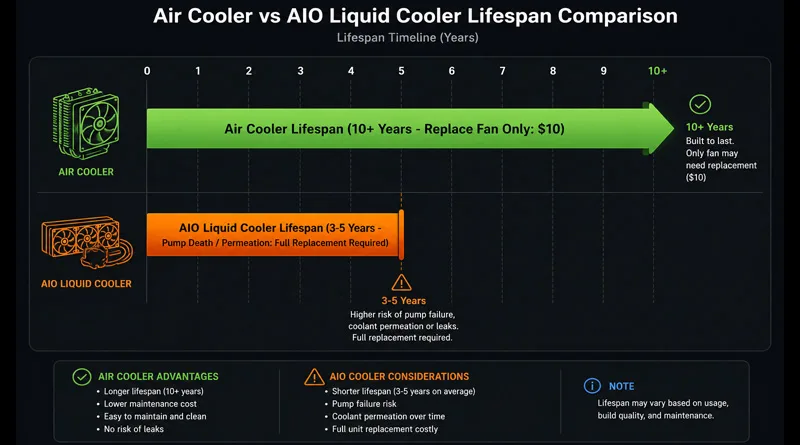
All liquid coolers suffer from microscopic evaporation called liquid permeation. Over 3 to 5 years, water slowly evaporates through the rubber tubing. Air bubbles form inside the loop, leading to gurgling noises, reduced cooling efficiency, and eventual pump burn-out. When an AIO dies, the entire $150 unit must be thrown in the trash.
2. The Immortality of Air Coolers
An air cooler is a solid block of aluminum and copper heatpipes. There is nothing to evaporate, nothing to leak, and no pump to die.
- The 10-Year Fix: If a fan fails after seven years, you spend $10 on Amazon for a new standard fan, clip it on, and your cooler is 100% brand new again.
3. Leak Anxiety
While modern AIO manufacturing is very good, the risk of a coolant leak spraying conductive fluid onto your $800 graphics card or motherboard is never zero. With an air cooler, that risk is strictly zero.
Proper cooling protects your motherboard power delivery. Learn more in Motherboard VRMs Explained: The Secret to Stability.
4. The $35 Budget Revolution vs. $150 Aesthetics
The financial math of aio vs air cooling has completely changed in 2026 thanks to budget hardware innovation.
The Air Cooler Champions on Amazon
Coolers like the Thermalright Peerless Assassin 120, Thermalright Phantom Spirit 120, and DeepCool AK620 cost between $35 and $60. They feature 6 to 7 heatpipes and dual fin stacks, matching the cooling power of legacy $100 Noctua coolers and $150 AIOs at a fraction of the cost.
When an AIO Is Still Worth the Money
- Clean Interior Glass: AIO liquid coolers remove the massive metal tower from the center of your motherboard, giving you an unobstructed view of your RAM and RGB lighting.
- LCD Display Customization: If you want an animated GIF or real-time temperature readout directly on your CPU block, you must buy a premium AIO like the NZXT Kraken Elite or Corsair iCUE Link.
5. Is an AIO or Fan Cooler Better for Your Rig? (The Decision Matrix)
Use this quick checklist to settle the aio vs air cooling question for your build:
Choose AIR COOLING if:
- You are building with a Ryzen 5/7 (7600X, 7800X3D) or Intel Core i5/i7 (13400F, 14600K).
- You want a cooler that will last for 10+ years with zero maintenance.
- You want silent idle operation without pump whine.
- You want the absolute best cooling performance for under $40.
- Top Pick: Thermalright Peerless Assassin 120 SE or Noctua NH-D15 G2.
Choose an AIO LIQUID COOLER if:
- You are running a high-wattage 250W+ CPU like the Intel Core i9-14900K for professional workstation rendering.
- You are building inside a compact Mini-ITX case where a tall air cooler will not fit.
- You demand a clean, modern aesthetic with visible RAM and an LCD screen.
- Top Pick: ARCTIC Liquid Freezer III 360 or NZXT Kraken Elite 360.
Conclusion: Value and Longevity Belong to Air
The aio vs air cooling debate in 2026 has a clear winner for most gamers: Air cooling provides superior reliability, zero failure risk, and identical gaming frame rates for $100 less.
Unless you are running a boiling flagship CPU or building a showcase PC for social media, pocket the $100 savings from a great air cooler and invest it into a faster GPU or a better monitor. Your system will be quieter, your wallet will be fuller, and your PC will run safely for years to come.
Check out GamersNexus’ comprehensive CPU cooler benchmark database on YouTube