

BLUF (Bottom Line Up Front): No, standard unpadded floor gaming chairs are generally bad for your lower back because they force your pelvis to tilt backward, flattening the natural curve of your lumbar spine. However, structured floor rockers like the X Rocker 2.1 or padded floor chairs with built-in lumbar cushions can be good for short console gaming sessions if you maintain proper hip-to-knee angles.
Understanding whether are floor gaming chairs good for your back comes down to spinal mechanics and session duration. While console players love floor chairs for their relaxed TV viewing angle, sitting on the ground removes the leg support that standard office chairs provide. This guide breaks down the medical reality of floor sitting, compares different floor chair designs, and provides four actionable steps to protect your spine. If you are shopping for a new seat, explore our top picks in The 5 Best Floor Gaming Chairs in 2026.
1. Why Floor Sitting Causes Strain: Are Floor Gaming Chairs Good for Your Back?
The primary reason are floor gaming chairs good for your back is a frequent concern is that sitting at ground level removes the support of your hamstrings and feet.
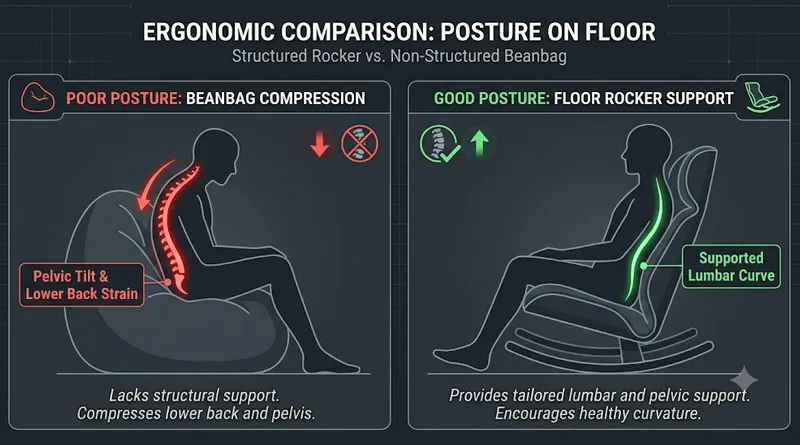
When you sit on the floor, your hamstrings tighten, pulling your pelvis backward into a posture known as “posterior pelvic tilt.” This flattens your lower spine’s natural inward curve (lumbar lordosis), placing high pressure on your intervertebral discs.
Over a two-hour gaming session, this un-supported posture leads to muscle fatigue, stiffness, and lower back aches. Standard flat floor cushions offer zero resistance against this pelvic tilt, making them terrible for long-term health.
Physical posture is the foundation of competitive longevity. Learn our 7 rules for a pain-free setup in Weight Gaming: The Ultimate Ergonomics Guide.
2. Rocker Chairs vs. Beanbags: Comparing Floor Seat Ergonomics
The physical design of your floor seat determines whether are floor gaming chairs good for your back over extended play.
Structured Floor Rockers (The Better Choice)
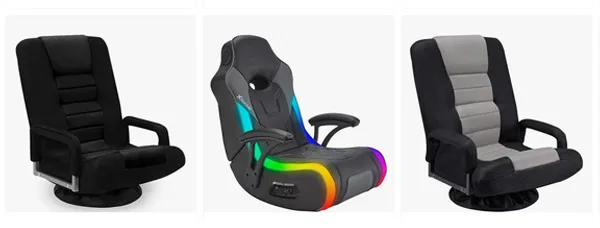
Rockers like the X Rocker Pro Series or Crew Furniture Classic feature an L-shaped frame that mimics an adult chair bucket.
- The Ergonomic Benefit: The hard frame supports your upper back and maintains an 80-to-90-degree angle between your torso and thighs. This prevents your spine from completely collapsing backward.
Unstructured Beanbags and Pads (The Harmful Choice)
Soft beanbags offer zero structural resistance. Your body sinks into the material, forcing your spine into a continuous “C-shape” curve.
- The Ergonomic Risk: Sitting in an unstructured beanbag for more than 30 minutes severely strains the lower back muscles and neck extensors.
3. Action Guide: How to Use a Floor Gaming Chair Without Back Pain
If you love the living room console experience, you can make your floor seat safer by implementing these four physical adjustments.
Step 1: Add an External Lumbar Pillow
Most floor rockers lack adjustable lower-back support. Place a small firm cushion or rolled-up towel directly behind your lower back to maintain your spine’s natural curve.
Step 2: Use a Footrest or Elevate Your Knees
Never extend your legs completely flat on the floor while sitting in a floor chair. Bend your knees at a 90-degree angle with your feet flat on a low footrest. This relieves tightness in your hamstrings and tilts your pelvis forward into a neutral position.
Step 3: Align the TV Screen to Eye Level
Looking down at a TV sitting on a low media console causes severe neck strain. Mount your TV or raise your entertainment stand so the top third of the screen matches your eye level while seated in the floor chair.
Screen placement is just as important as your seat. See: The Ultimate Healthy Gaming Setup Guide.
Step 4: The 45-Minute Limit Rule
Because floor chairs lack full-leg weight distribution, you should never sit in one continuously for more than 45 minutes. Stand up, stretch your hip flexors, and walk around for 2 minutes between matches.
4. Console vs. Desktop: Where Floor Chairs Fail
Asking are floor gaming chairs good for your back requires separating console gaming from PC desktop gaming.
- Console Gaming (Recommended Use): Floor chairs work well for controllers because your hands rest comfortably in your lap, allowing your shoulders to stay relaxed against the backrest.
- PC Desktop Gaming (Dangerous Use): Never use a floor gaming chair at a standard computer desk. Reaching up toward a keyboard and mouse from ground level destroys shoulder alignment and places immense pressure on your wrist tendons.
Conclusion: Make the Health-Conscious Choice
So, are floor gaming chairs good for your back? They are acceptable for short, casual console sessions if you choose a structured rocker with added lumbar support and keep your knees bent. However, they should never replace a proper ergonomic desk chair for daily PC gaming.
Protect your spine, support your lower back, and take regular standing breaks to keep your body pain-free. For a complete review of the safest and most comfortable floor models on the market today, check out our full list in The 5 Best Floor Gaming Chairs in 2026.
Read the Mayo Clinic’s official guidelines on sitting posture and spinal health