
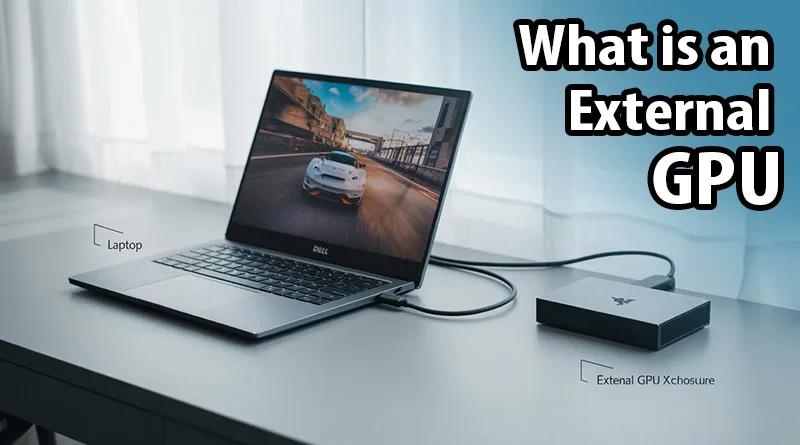
So, what is an external GPU? It’s a question thousands of laptop owners ask when they crave more gaming or creative performance without buying a whole new desktop PC. In simple terms, an external GPU (or eGPU) is a solution that allows you to connect a powerful, full-sized desktop graphics card to your laptop through a single high-speed cable.
This comprehensive guide will fully answer the question, “what is an external GPU?”. We will dive deep into the technology, explore the advantages and drawbacks, and review the best external GPU enclosures on the market today. This is your complete resource for understanding how to bring desktop-class graphics power to your laptop.
This comprehensive guide will answer all of those questions. We will dive deep into the technology behind external graphics processing units (eGPUs), explore their significant advantages and potential drawbacks, and finally, review the best external GPU enclosures on the market today. This is your complete resource for understanding how to bring desktop-class graphics power to your laptop.
How an External GPU Works: A Deeper Dive
To understand **what is an external GPU**, you first need to know that it is a dedicated, full-size desktop graphics card that lives outside of your computer. This hardware sits in its own special box, called an **eGPU enclosure**.
This enclosure is a sophisticated piece of hardware that contains two crucial components:
- A Power Supply Unit (PSU): A desktop graphics card is far too power-hungry to run off a laptop’s internal power. The eGPU enclosure has its own built-in PSU to provide all the electricity the graphics card needs.
- A PCIe Slot: This is the same type of slot you’d find on a desktop motherboard, where the graphics card is physically installed.
The entire enclosure then connects to your laptop via a single, high-bandwidth cable—almost always a Thunderbolt 3 or Thunderbolt 4 cable. This Thunderbolt connection is the magic key; it has enough bandwidth to carry the massive amounts of data required for high-end gaming back and forth between your laptop’s CPU and the external GPU.
Once connected, your laptop recognizes the eGPU and, in most cases, will automatically begin routing all graphically intensive tasks—like running a video game—to the powerful desktop card in the enclosure instead of using its own weaker, integrated graphics. In essence, you are bypassing your laptop’s built-in graphics and using a much more powerful external one.
Answering “What is an External GPU?” by Looking at Pros and Cons
An external GPU setup can be a game-changer, but it’s essential to understand the pros and cons. Learning about the limitations of an external GPU is just as important as understanding the benefits.
Advantages of an External GPU:
- Massive Performance Uplift: This is the number one reason to get an eGPU. You can take a standard ultrabook that can barely run Minecraft and give it the power to play Cyberpunk 2077 at high settings.
- The “One Laptop” Dream: The ultimate answer to **what is an external GPU** is that it allows you to have a single, perfect device for everything. You can have a thin, light, and portable laptop with great battery life for class or work, and when you get home, you plug in one cable to turn it into a full-fledged gaming and creative workstation.
- Upgradability: Unlike a gaming laptop, an eGPU is fully upgradable. When a new generation of graphics cards comes out, you can simply open your enclosure and put in a new one.
- Superior Cooling: An eGPU enclosure is spacious and well-ventilated, allowing the desktop graphics card to run at its full, unthrottled potential.
Disadvantages of an External GPU:
- The Thunderbolt Requirement: Your laptop must have a Thunderbolt 3 or Thunderbolt 4 port. A standard USB-C port will not work.
- Performance Overhead: You will lose a small amount of performance—typically around 10-15%—compared to using the exact same graphics card inside a desktop PC. The experts at eGPU.io, a fantastic resource for the community, have thousands of user benchmarks that illustrate this performance delta.
- Cost: The total cost can often be as much as a mid-range gaming PC, a topic we cover in our guide on what to look for when buying a pre-built gaming PC.
- Portability: Another factor in understanding **what is an external GPU** is its portability. While your laptop remains portable, the eGPU enclosure itself is a bulky, heavy box that needs its own power outlet. It’s a “docking station” solution, not something you’d carry around in a backpack.
The Best External GPU Enclosures of 2026
The enclosure is the heart of your eGPU setup. Now that we’ve answered what is an external GPU it’s time to look at the hardware. The real power comes from the component you put inside, so choosing one of the best high-end graphics cards is crucial. Here are the top eGPU enclosures currently available.
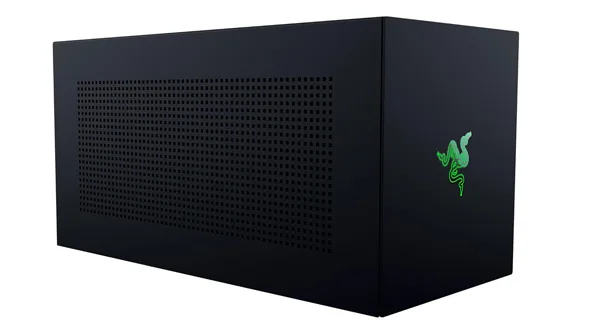
1. Razer Core X V2: The Best Overall External GPU Enclosure
The Razer Core X series is the gold standard for eGPUs, and the V2 continues that legacy. It offers the perfect blend of power, compatibility, and a user-friendly design. With support for the latest 4-slot NVIDIA and AMD graphics cards and a robust power supply, it’s built to handle the most powerful GPUs on the market. The tool-less design makes installation a breeze, and its Thunderbolt 4/5 connectivity ensures you’re getting the fastest possible connection to your laptop. It also provides 140W of power delivery via USB-C, enough to charge even the most demanding laptops.
- Connectivity: Thunderbolt 4/5, USB-A & USB-C
- Power Delivery: 140W via USB-C
- Max GPU Size: 4-Slot
- Best For: Users who want a premium, powerful, and easy-to-use solution.
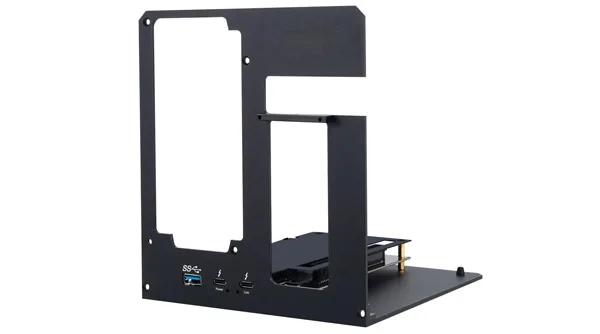
2. eGPU Enclosure (Generic Thunderbolt 3/4): The Best Value Option
This generic eGPU enclosure is a fantastic find for the user who wants pure performance without paying for a big brand name. It delivers the core features you need: a fast Thunderbolt 3/4 40Gbps connection and an open-frame design that supports a standard ATX power supply. This open design is excellent for thermal performance and provides maximum compatibility with even the largest graphics cards. It also includes 85W power delivery, which is plenty to charge most ultrabooks while you game.
- Connectivity: Thunderbolt 3/4
- Power Delivery: 85W PD Charging
- Max GPU Size: Compatible with most cards (Open Frame)
- Best For: DIY enthusiasts and users who want the best performance-per-dollar.
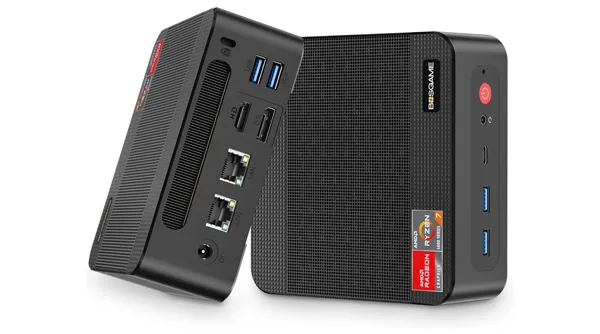
3. BOSGAME External GPU Docking Station: The Best for Mini PCs
The BOSGAME eGPU is designed for a specific but growing market: users of Mini PCs and compact laptops. It comes bundled with a capable AMD Radeon 7600M XT graphics card, which is a fantastic GPU for 1080p gaming. What makes it unique is its connectivity, offering not just a USB4 (Thunderbolt compatible) port but also an Oculink port, a specialized high-speed connector found on many new Mini PCs. This makes it an incredibly versatile and powerful all-in-one upgrade for small-form-factor users.
- GPU Included: AMD Radeon 7600M XT
- Connectivity: USB4, Oculink, HDMI 2.1, DisplayPort 2.0, USB-A
- Best For: Mini PC users and those who want an all-in-one solution with a GPU included.
Conclusion: A Bridge Between Worlds
To bring it all together and answer the core question one last time: what is an external GPU? It’s more than just a piece of hardware; it’s a bridge between portability and performance. It is the key to unlocking the true gaming potential of a compatible laptop, allowing you to maintain a single, versatile device for both work and play.
While the cost and technical requirements mean it’s not for everyone, for the right user, an eGPU setup is a dream come true. If you’re a laptop user who craves desktop-level power, investing in a high-quality enclosure like the Razer Core X V2 is the ultimate upgrade, offering a level of performance that no gaming laptop can match.